
How to Prevent Spam Orders in WooCommerce: Signs, Causes and Safe Fixes
Bursts of fake or failed orders can mean bots or card testing. Learn the signs, what to tell your payment provider and…
When WooCommerce emails are not sending, work out whether the email was triggered, generated, handed to the mail system, delivered or filtered as spam. The email logs show which.
WooCommerce emails not sending does not tell you where the email stopped. It may never have been triggered, been switched off, failed on your server, or been sent and then filtered as spam. WooCommerce says that in many cases the problem is not WooCommerce generating the email, but the core mail function on the web host or another step in the process. This guide separates those stages and uses the logs to show which one fails.
Place a safe test order and look at its status. If it stays on Pending payment, no email is triggered at all. If it reaches Processing, check WooCommerce → Settings → Emails to see the email is enabled. Then open WooCommerce → Status → Logs and filter the source transactional-emails: it shows Sent, Failed, Disabled or Skipped for each attempt. Failed usually points at your host’s mail sending, so use a dedicated SMTP provider. Sent but not received points at spam filtering, the From address and email authentication.
How this guide was prepared: the steps follow the WooCommerce documentation listed under Sources, read on October 19, 2026. We did not reproduce this problem on a live store for this guide, so the steps are research-based. The transactional email log screen is described in the current WooCommerce documentation, and it may not exist in older versions.
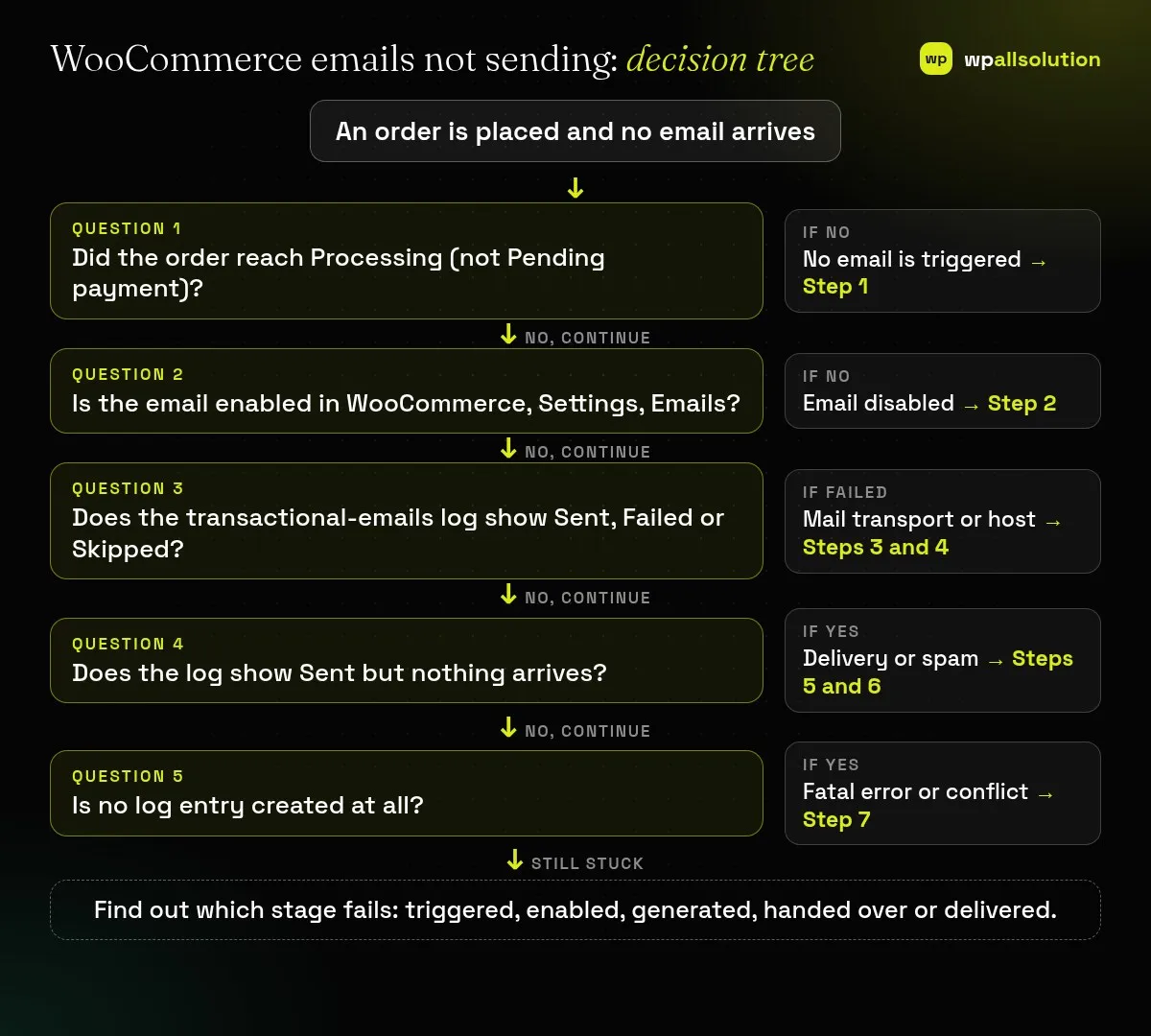
| What you see | Likely cause | Start with |
|---|---|---|
| Order stays Pending payment, no email | No email is triggered for unpaid orders | Step 1 |
| Log says Disabled | The email type is switched off | Step 2 |
| Log says Skipped | A required value, such as a recipient, is missing | Step 3 |
| Log says Failed | The site’s mail sending failed | Step 4 |
| Log says Sent, nothing arrives | Spam filtering, From address or authentication | Steps 5 and 6 |
| No log entry | Fatal error or conflict before sending | Step 7 |
WooCommerce says that if your new orders show Pending payment, no email will be sent. That can be a customer who abandoned the external payment page, or a declined card. If payment was actually received but the status did not update, you are looking at a payment gateway problem rather than an email problem. Our guide WooCommerce payment successful but order pending covers that case.
Go to WooCommerce → Settings → Emails, open the relevant email and make sure Enable this email notification is ticked. WooCommerce says that when orders reach Processing and the email is enabled but still not sent, a conflict is likely. Also check the recipient field for admin emails.
WooCommerce documents a log of each transactional email attempt. Create a test order or trigger the email, go to WooCommerce → Status → Logs, and open the source transactional-emails. The outcomes are:
For order emails, sent and failed attempts are also added as private order notes. If you see no entries, check WooCommerce → Status → Logs → Settings to confirm logging is on and the threshold is not hiding entries. WooCommerce also says the log does not store raw customer addresses. Emails from other plugins and WordPress itself, such as password resets, may not appear there, so check your SMTP provider’s logs for those.
WooCommerce sends mail with the WordPress wp_mail() function, which depends on your host. Hosts can limit or disable it. WooCommerce recommends signing up with a dedicated SMTP provider, which is usually more reliable than your own server, and an average site can often stay within free usage. Its documentation on email and SMTP providers explains how email works. Set up the provider in an SMTP plugin, keep credentials inside the plugin, and send a new test order.
WooCommerce says using a public address such as Gmail or Yahoo as the From address is likely to land emails in spam, because the declared sender does not match the server that actually sent the mail. Under WooCommerce → Settings → Emails, use an address on your own domain, for example orders@yourdomain.com, and make sure that mailbox exists.
Mail providers check that a message really comes from the domain it claims. WooCommerce has a page on email authentication and sender requirements, and your SMTP provider will tell you which DNS records to add (commonly called SPF, DKIM and DMARC). Also check the recipient’s spam folder and any filters. Send a test to a second address at another provider to see if the problem is general or only one inbox.
If no log entry is created when one should be, WooCommerce says to check logs for fatal errors and to rule out conflicts. On a staging copy, switch to a default theme, deactivate all plugins except WooCommerce, place a test order, then reactivate one at a time. Our guide How to find the plugin that broke your site explains the method. Plugins that customise emails, orders or memberships are frequent suspects.
WooCommerce does not trigger the usual order emails until the order is paid and reaches Processing.
Not always, but WooCommerce recommends a dedicated SMTP provider for reliability.
Sent means WooCommerce handed the email to the mail system. Delivery, spam filtering and authentication come after that.
Not necessarily. Check your SMTP provider’s logs or a mail logging plugin.
Related guide: WordPress Emails Going to Spam: SPF, DKIM and DMARC Explained
Find which stage fails and fix only that stage. If WooCommerce emails are still not sending, send your host or SMTP provider the log entry, the time and the order number, without personal data. If you would like a person to look, wpallsolution offers independent plugin support, and our WooCommerce customization page explains what we build. We cannot promise a fix without seeing your setup.
Related guides: WooCommerce checkout not working.
Last reviewed: October 19, 2026. WooCommerce is a trademark of its owner. wpallsolution is not affiliated with or endorsed by WooCommerce or Automattic.
Bursts of fake or failed orders can mean bots or card testing. Learn the signs, what to tell your payment provider and…
An Indian store has to charge, show and record GST correctly. See how WooCommerce tax settings, classes and rates fit together, and…
Product imports fail for a few predictable reasons. Check the file format, column names, SKU matching, variations, images and server limits one…
Black FridayCyber Monday sale
Before you go,
Our biggest discount of the year on the first payment of every maintenance plan.
BF2026 at checkout