
How to Prevent Spam Orders in WooCommerce: Signs, Causes and Safe Fixes
Bursts of fake or failed orders can mean bots or card testing. Learn the signs, what to tell your payment provider and…
When a WooCommerce payment is successful but the order stays pending, the gateway and your store are not agreeing on status. Follow the lifecycle through notes, webhooks and logs.
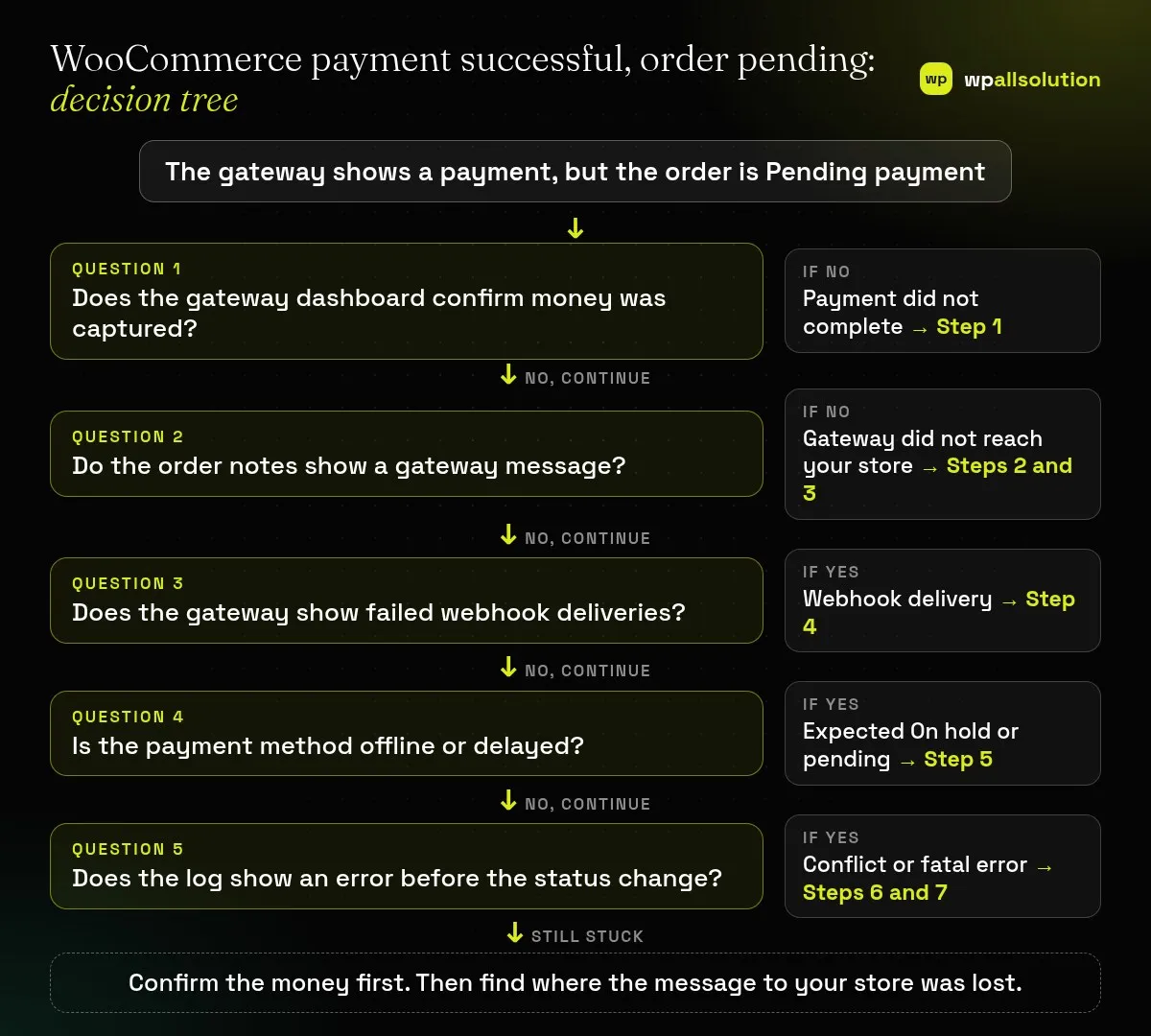
WooCommerce payment successful order pending is the worrying case where the gateway says the customer paid, but your store still shows Pending payment. In most cases the money is not lost: the message that should tell your store about the payment did not arrive, or an error stopped the status change. This guide follows the payment from the gateway to the order, one step at a time, and it never asks you to mark an order paid without proof.
First confirm in the gateway’s own dashboard that the payment was really captured, not only authorized. Then read the order notes for a gateway message. If there are none, the gateway probably did not reach your store, so check the gateway’s webhook settings and its delivery log, then WooCommerce → Status → Logs. Remember that offline and delayed methods are supposed to stay On hold. Only after you have verified the payment should you change the order status.
How this guide was prepared: the steps follow the WooCommerce documentation listed under Sources, read on October 19, 2026. We did not reproduce this problem on a live store for this guide, so the steps are research-based. Each gateway behaves differently, so its own documentation comes first. Test only in the gateway’s test mode on staging.
| What you see | Likely cause | Start with |
|---|---|---|
| Gateway shows paid, order is Pending payment | Gateway could not update the order | Steps 2 to 4 |
| No payment notes on the order | No message reached the store | Steps 3 and 4 |
| Order is On hold after bank transfer | Expected: waiting for manual confirmation | Step 5 |
| Order is Processing but the customer wanted Completed | Expected: you complete it after fulfilment | Step 5 |
| Payment authorized but no money moved | Authorize only, not capture | Step 1 |
| Pending only on some orders | A conflict or error mid-process | Steps 6 and 7 |
Open the gateway’s own dashboard and look up the transaction. WooCommerce says to verify that the gateway is set to both Authorize and Capture the charge, because an authorization only places a hold on funds and needs a manual capture before money moves. If the transaction is only authorized, capture it according to your gateway’s documentation. If there is no transaction at all, the payment did not complete and the order is correctly pending.
WooCommerce explains that order notes can reveal declines, authentication failures and gateway timeouts, with timestamps. Open the order and read the Order notes panel. Note which gateway and transaction ID were used. WooCommerce adds that having no notes related to the payment attempt is itself a signal: the gateway may have failed to communicate with your store, or the process was interrupted before it completed.
Go to WooCommerce → Status → Logs and look for the log file of the gateway used. WooCommerce says logs exist only if logging is enabled in the gateway’s settings, and that only new transactions are captured once it is switched on, so you may need a test order. A log that shows a payment starting but never finishing means the process stopped, and the gateway’s support is the next stop. The same Logs screen also shows PHP fatal errors, which Step 7 uses.
WooCommerce describes a webhook as a real-time notification that lets the gateway tell your store when a payment status changes. Some gateways need manual setup, and some handle it automatically. For example, WooCommerce says the Stripe extension requires manual webhook configuration, and suggests reconfiguring them if you see pending payments. Check the webhook in the gateway dashboard: is the endpoint your current site address, is it enabled, and does its delivery log show errors? If your site recently changed domain, moved to HTTPS or added a firewall, the endpoint may be wrong or blocked. WooCommerce’s own Webhooks settings (WooCommerce → Settings → Advanced → Webhooks) are a separate feature, but WooCommerce notes that it disables a webhook after more than five consecutive delivery failures, and keeps a webhooks-delivery log under Status → Logs.
WooCommerce’s order status guide says Pending payment means the order was received but no payment has been confirmed, Processing means payment was received and the order awaits fulfilment, and On hold means payment confirmation is still needed, typically for offline methods like bank transfer. Orders do not move from Processing to Completed on their own. Delayed methods such as SEPA Direct Debit are expected to stay On hold for a while. Read the gateway’s documentation to see which statuses it uses.
WooCommerce’s email guide says a conflict with your theme, custom code or another plugin can produce an error before the order status changes. To test, use a staging copy, switch to a default theme, deactivate everything except WooCommerce and the gateway, and repeat a test payment in sandbox mode. Reactivate one at a time. Our guide How to find the plugin that broke your site explains the method.
WooCommerce says its Logs screen records PHP fatal errors and recommends checking it before the server’s own PHP error logs. If an error occurs just as the order should be updated, you will see it there. Ask your host for the PHP error log if nothing appears. Remove secrets before sharing any log.
Only after you have confirmed the payment in the gateway or your bank. Marking it paid without proof can ship goods that were never paid for.
It is possible. Check the gateway first before asking a customer to pay again.
WooCommerce says no order email is triggered while an order stays in Pending payment.
Not necessarily. It is usually the message between the gateway and your store that is missing, which can be a webhook, firewall or conflict problem.
Related guide: WooCommerce HPOS: What High-Performance Order Storage Is and How to Enable It Safely
Verify the payment, then find where the message was lost. If the WooCommerce payment is successful but the order stays pending after these steps, send your gateway’s support the transaction ID, the time and the webhook log, without secrets. If you would like a person to look, wpallsolution offers independent plugin support and payment gateway integration. We cannot promise a fix without seeing your setup.
Related guides: WooCommerce checkout not working.
Last reviewed: October 19, 2026. WooCommerce is a trademark of its owner. wpallsolution is not affiliated with or endorsed by WooCommerce or Automattic.
Bursts of fake or failed orders can mean bots or card testing. Learn the signs, what to tell your payment provider and…
An Indian store has to charge, show and record GST correctly. See how WooCommerce tax settings, classes and rates fit together, and…
Product imports fail for a few predictable reasons. Check the file format, column names, SKU matching, variations, images and server limits one…
Black FridayCyber Monday sale
Before you go,
Our biggest discount of the year on the first payment of every maintenance plan.
BF2026 at checkout