
Elementor Popup Not Working? Check Conditions, Triggers and Advanced Rules
An Elementor popup needs conditions, a trigger and passing rules before it shows. Check each in order, plus the multiple-popup option and…
If the Elementor editor is not opening, the cause can be a setting, the wrong page, a plugin or theme conflict, a browser extension or a server limit. Isolate it safely, one change at a time.
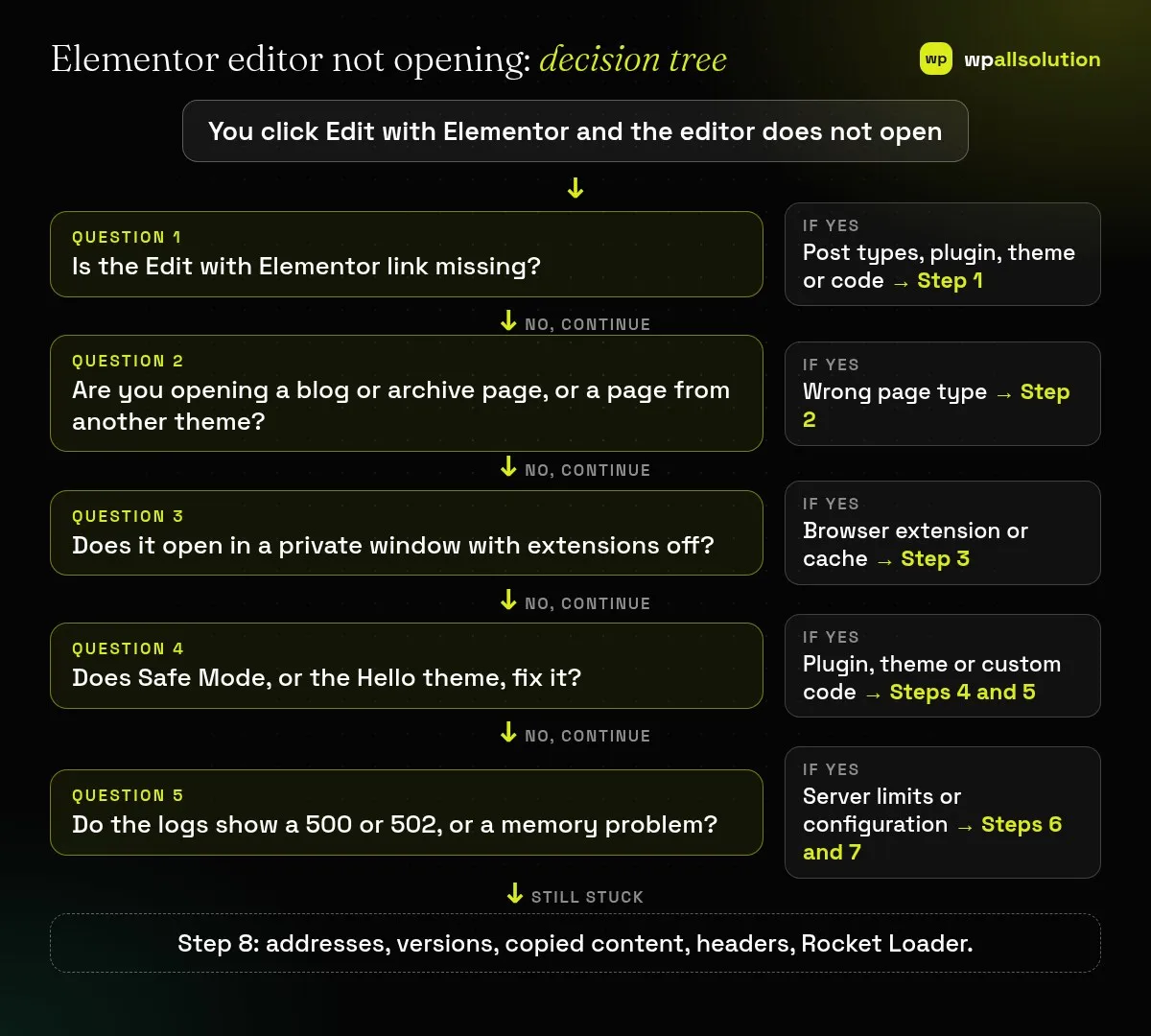
Elementor editor not opening can look like a white screen, a grey page that never finishes loading, a widget panel that stays grey, a redirect to the live page, or no Edit with Elementor link at all. Elementor’s help centre treats these as separate symptoms with separate causes. This guide gives you a safe isolation sequence: confirm the basics, read the evidence, then test plugins, theme and server settings one at a time.
Check that Elementor is enabled for your post type and that you are opening an editable page. Test in a private window. Read the browser console and, if you can, the PHP error log. Then use Safe Mode to separate plugin and theme problems from server problems, and only after that look at memory limits, 500 and 502 errors, addresses and headers.
How this guide was prepared: the steps follow Elementor’s help articles and the WordPress documentation listed under Sources, read on October 19, 2026. We did not reproduce this problem on a live Elementor site for this guide, so the steps are research-based. Menus change between Elementor versions, and hosts differ, so no single fix works everywhere.
| What you see | Likely cause | Start with |
|---|---|---|
| No Edit with Elementor link in the admin bar | Post type not enabled, plugin, theme or custom code | Step 1 |
| You are sent to the live page, or the blog page will not open | Page type or theme that Elementor cannot edit directly | Step 2 |
| Works in a private window only | Browser extension or cache | Step 3 |
| Grey page or blank white screen | Conflict, JavaScript error, addresses, headers or memory | Steps 4 to 8 |
| Widget panel grey or spinning | Plugin conflict or low memory limit | Steps 4 and 7 |
| Error 500 or “Internal Server Error” | Memory, fatal error, plugin, damaged .htaccess | Step 6 |
| Error 502 | Server or proxy response problem | Step 6 |
If the link is missing from the admin bar, Elementor says the primary cause is that the post types are not selected in its settings. In WP Admin go to Elementor → Editor → Settings and select the post types you want to build with Elementor. If the link is still missing, Elementor’s article tells you to deactivate all plugins except Elementor and see whether it returns, then reactivate them one by one. It also suggests switching temporarily to the Hello theme (your theme settings are kept and return when you switch back) and removing custom code to test.
Elementor’s “Can’t edit” article warns that you may be trying to edit a page created with a different theme, or the Blog (posts) page, which cannot be edited with Elementor. Dynamic archives such as the shop page are edited through Theme Builder templates, not by opening the page directly. See Elementor preview could not be loaded for how that works.
Open a private window (Ctrl+Shift+N in Chrome), log in to WP Admin and open the editor. Elementor lists ad blockers and other extensions as causes of a stuck editor. If it opens, clear your normal browser’s cache and disable extensions one at a time. Also try another browser.
Right-click the grey page, choose Inspect and open the Console. Look for red errors, the file named in each one, and any mention of frames or cross-origin rules (see Step 8). A white screen often means a fatal PHP error. Elementor suggests asking your host for the PHP error log, or checking the email WordPress sends about a critical error.
The WordPress debugging documentation shows how to log errors privately. Back up wp-config.php, then add:
define( 'WP_DEBUG', true );
define( 'WP_DEBUG_LOG', true );
define( 'WP_DEBUG_DISPLAY', false );
Reload the editor once and read wp-content/debug.log. Redact private details before sharing it, and switch debugging off afterwards.
Our guide How to find the plugin that broke your site explains this method in detail, and Elementor stuck on loading screen covers the grey-page case more broadly.
.htaccess file. Re-saving permalinks (Settings → Permalinks → Save Changes) regenerates it. Elementor also says to contact your host.SubstituteMaxLineLength 10M inside a mod_substitute block in .htaccess. Back up .htaccess before editing it, or ask your host to do it.Elementor’s widget panel article says a panel stuck on a spinning loader can come from the memory limit, a plugin conflict or a server setting. In Elementor’s System Info (Elementor → Editor → System) look at the memory values. Elementor says the WordPress default of 40 MB is far too low for a page builder and recommends at least 256 MB, or 512 MB with heavy plugins such as WooCommerce. Raising it is a host setting or a wp-config.php line, which should go above the comment that tells you to stop editing:
define( 'WP_MEMORY_LIMIT', '512M' );Back up the file first and remove the line to undo it. Many hosts cap memory, so if nothing changes, ask them. See Elementor’s requirements page for the full list of server requirements.
Elementor lists this among the “can’t edit” symptoms. Check that Elementor is enabled for the post type and that you are not on the Blog page (Steps 1 and 2).
No. A white screen is more often a PHP error, so look at the error log. A grey screen means the editor did not finish loading, which is more often a script, header or conflict problem.
You can try the editor loader setting. The server-level change needs file access, so ask your host if you are unsure.
No. Deactivate them temporarily instead, and keep a backup.
Go through the steps in order. If the Elementor editor is still not opening, send your System Info, the console error and the PHP log (redacted) to Elementor support or your host. If you would like a person to look, wpallsolution offers independent plugin support, and our Elementor development page explains how we build and tidy Elementor sites. We cannot promise a fix without seeing your site.
Last reviewed: October 19, 2026. Elementor is a trademark of its owner. wpallsolution is not affiliated with or endorsed by Elementor.
An Elementor popup needs conditions, a trigger and passing rules before it shows. Check each in order, plus the multiple-popup option and…
The free Elementor plugin covers more than many expect, but Pro adds the Theme Builder, popups, forms and WooCommerce tools. See which…
Moving from Elementor to a block theme is a rebuild, not a switch. Use this checklist to audit, test on staging and…
Black FridayCyber Monday sale
Before you go,
Our biggest discount of the year on the first payment of every maintenance plan.
BF2026 at checkout