
Elementor Popup Not Working? Check Conditions, Triggers and Advanced Rules
An Elementor popup needs conditions, a trigger and passing rules before it shows. Check each in order, plus the multiple-popup option and…
The free Elementor plugin covers more than many expect, but Pro adds the Theme Builder, popups, forms and WooCommerce tools. See which you need.
Elementor free vs Pro is a decision many business owners face when a developer or a tutorial says “you need Pro” without explaining why. The free plugin is a complete page builder with a long list of widgets, while Pro adds site-wide tools such as the Theme Builder, popups, forms and a WooCommerce builder. This guide lists what each includes, according to Elementor’s own pages, and gives you a way to decide from the needs of your site, not from the pitch. We build with Elementor ourselves, so we say plainly when Pro is not necessary.
The free Elementor plugin gives you a visual page builder with over 40 free widgets, responsive editing, templates and more, which is enough to design many pages. Elementor Pro adds features such as the Theme Builder (custom headers, footers, single posts and archives), Popup Builder, Form Builder, WooCommerce Builder, Dynamic Content, custom code and CSS, and motion effects. If you need those, Pro is the route inside Elementor; if you only design pages, free may be enough. Check current plans and terms on Elementor’s site before you buy.
How this guide was prepared: it is research-based. We used the Elementor listing on WordPress.org and Elementor’s Pro page listed under Sources, checked on October 23, 2026. Features, names and plans change, so confirm them on Elementor’s own pages. We quote no prices. We did not test your site.
| Area | Elementor Free | Elementor Pro adds |
|---|---|---|
| Page design | Drag-and-drop visual editor, over 40 free widgets, responsive editing with custom breakpoints | Additional Pro widgets such as Loop Grid, Posts, Slides and Off-Canvas |
| Templates | Template library with website kits, single pages, blocks and popups | Cloud templates for reuse across connected sites |
| Site-wide design | Design variables and classes for colours and typography | Theme Builder: headers, footers, single posts and archive pages |
| Popups | Popup templates in the library | Popup Builder with display conditions |
| Forms | Not part of the free feature list on the plugin page | Form Builder with multi-step forms and submissions in the dashboard |
| Content | Standard content widgets | Dynamic Content, dynamic tags, custom fields and custom post types support |
| Stores | General widgets | WooCommerce Builder for product pages, shop archives and mega menus, and 20+ store widgets |
| Code and effects | CSS transforms, entrance animations, mask shapes | Custom code and CSS, motion effects |
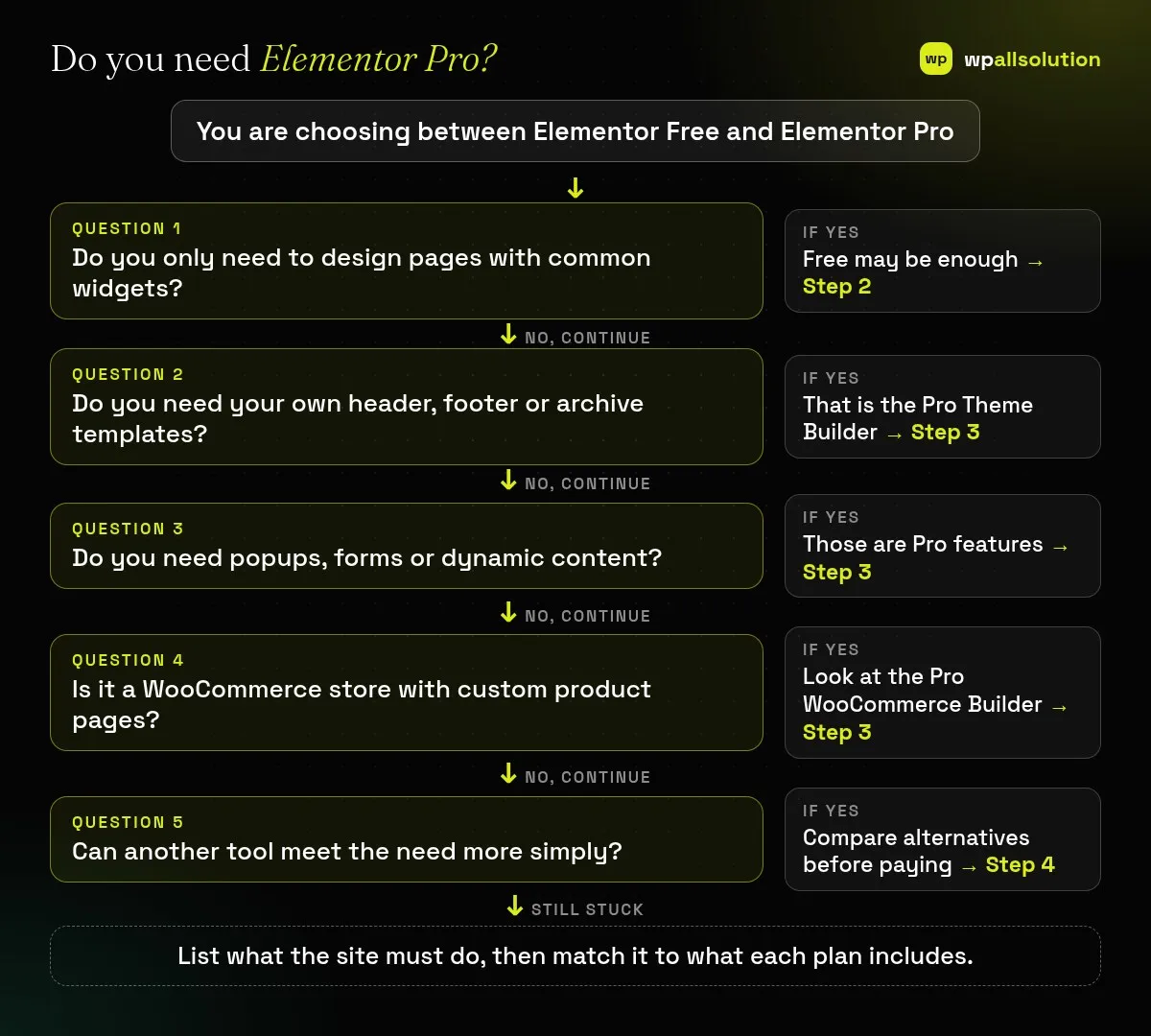
List the pages, the header and footer, forms, popups, any listings that pull from your content and, for a shop, product and checkout layouts. Mark which are must-haves and which are nice to have. Decisions based on this list are better than decisions based on a feature table.
The WordPress.org listing describes the free plugin as a no-code visual editor with a page builder, over 40 free widgets (heading, image, text, video, button, gallery and carousels), responsive design with custom breakpoints, a template library, revision history and animations. For a brochure site that mainly needs well-designed pages, this can be enough, particularly if your theme already provides the header and footer.
Elementor’s Pro page lists the Theme Builder, Popup Builder, Form Builder, WooCommerce Builder, Dynamic Content, dynamic tags, custom fields and custom post types support, custom code and CSS, and motion effects, among other tools. If you want one template to control all your headers and footers, post layouts or product pages, or you need popups and forms inside the builder, Pro covers that. For a header that does not appear, see Elementor header or footer not showing, and for popups see Elementor popup not working.
A need does not always require Pro. A block theme can control headers and footers with the WordPress Site Editor, and form plugins such as Contact Form 7 cover forms; see custom blocks vs page builders. Each alternative has its own cost: more plugins, a different editing experience or developer time. Choose the combination your team can maintain.
Pro is a paid product, so read the licence and renewal terms on Elementor’s site, including what happens to updates and support if the licence lapses. Every feature you use adds code, so keep sites lean: see how to keep Elementor sites fast and Elementor website slow. Plan updates and testing like any plugin; see how to update WordPress plugins safely.
Start with what your must-haves require. If free covers them, begin there and upgrade when a real need appears. If you already know that you need a theme builder or popups, choose Pro and use those features deliberately. Review after a few months: are you using what you pay for?
Yes, for many pages. Forms, popups and a custom header or footer need other tools or Pro.
It depends on whether you use its site-wide tools. List your needs first.
Check Elementor’s licence and support terms before you decide.
Any added feature adds code. Test speed on your own site.
Write your must-have list and match it to the table above. wpallsolution offers Elementor development and can tell you honestly whether your project needs Pro. We cannot promise outcomes without seeing your site.
An Elementor popup needs conditions, a trigger and passing rules before it shows. Check each in order, plus the multiple-popup option and…
Moving from Elementor to a block theme is a rebuild, not a switch. Use this checklist to audit, test on staging and…
A header or footer built in Elementor can vanish for five simple reasons. Check display conditions, page layout, publish status, device settings…
Black FridayCyber Monday sale
Before you go,
Our biggest discount of the year on the first payment of every maintenance plan.
BF2026 at checkout