
Elementor Popup Not Working? Check Conditions, Triggers and Advanced Rules
An Elementor popup needs conditions, a trigger and passing rules before it shows. Check each in order, plus the multiple-popup option and…
Elementor stuck on the loading screen? Work through nine fixes in order, from your browser and caches to plugins, the server and editor-specific causes.
Elementor stuck on loading screen means the editor opens to a blank grey panel and never shows your page. Elementor’s own documentation describes this as a grey screen that can have several different causes. That is why the fastest route is not to try everything at once. Work through the layers one at a time: your browser, the caches between you and your site, plugins and theme, the server, and finally the editor itself.
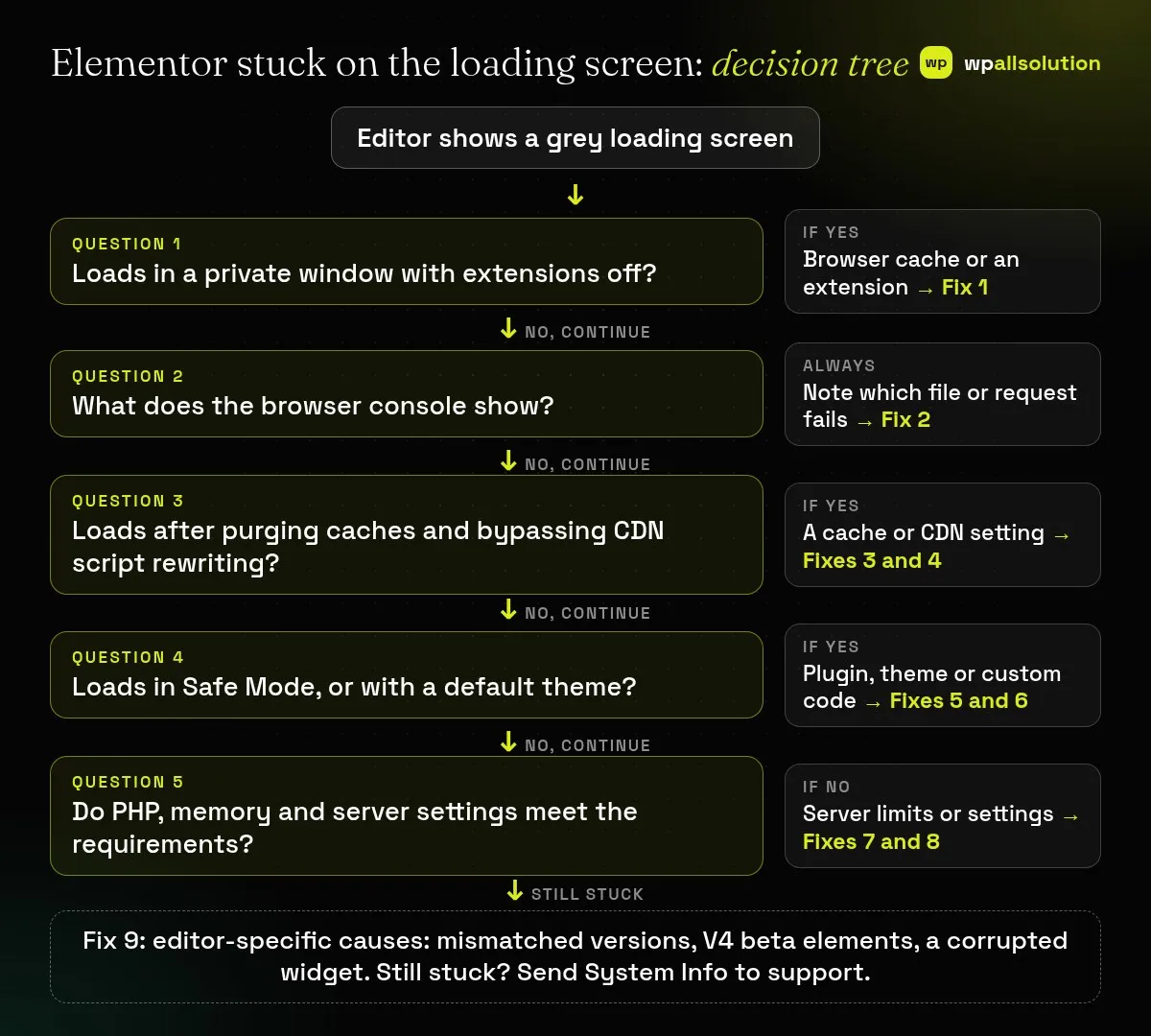
Open the editor in a private window with extensions off. If it still hangs, read the browser console, purge every cache layer and stop your CDN from rewriting scripts, then switch on Elementor Safe Mode. After that, check the server (PHP version, memory limit and the editor loader method). Only then look at editor-specific causes such as mismatched Elementor and Elementor Pro versions or a corrupted widget. Change one thing, test, and write down the result before you change the next.
This guide helps site owners, freelancers and developers who can log in to WordPress as an administrator. Where a step needs server access, it says so and tells you what to ask your host.
How this guide was prepared: the steps follow Elementor’s help articles and the WordPress developer documentation listed under Sources, which were read on October 19, 2026. We have not reproduced this problem on a live Elementor site for this guide, so treat every step as research-based. Menu names and screens change between Elementor, WordPress and hosting versions, and no single fix works in every setup.
wp-config.php. On a live store or a busy site, do not experiment during opening hours.Use these five questions in order. Each one rules out a whole layer, so you never test the server before you have ruled out your own browser.
| What you see | Likely layer | Start with |
|---|---|---|
| Works in a private window, hangs in your normal browser | Browser cache or an extension | Fix 1 |
| Red console errors that name a file in a plugin or theme folder | Plugin, theme or custom code conflict | Fixes 5 and 6 |
| Front end is fine, but the editor hangs after you enabled minify, “delay JavaScript” or Rocket Loader | Cache, optimisation or CDN | Fixes 3 and 4 |
Errors such as err_content_decoding_failed or err_empty_response | Server configuration | Fix 8 |
| Hangs on every page after a host change or PHP change | PHP version or memory limit | Fix 7 |
| Started right after updating only Elementor or only Elementor Pro | Version mismatch | Fix 9 |
| Only one page or template hangs | Corrupted widget or content | Fix 9 |
Browser add-ons such as ad blockers can block the scripts the editor needs, and cached files can be out of date. This costs you nothing and is completely safe.
If it still hangs: the browser is not the cause. Go to Fix 2.
The console turns “it is stuck” into a specific clue. Right-click the grey page and choose Inspect, then open the Console tab. In Chrome the shortcut is Ctrl+Shift+J (Cmd+Option+J on a Mac); in Firefox it is Ctrl+Shift+K (Cmd+Option+K).
/wp-content/plugins/ or /wp-content/themes/ names the plugin or theme involved.The console does not fix anything by itself, but it tells you which of the next fixes to try first.
Elementor’s documentation lists active caching or optimisation while editing (page cache, object cache, and JavaScript or CSS optimisation) among the causes of widget data getting out of sync. Cache can sit in four places, and each has its own purge button:
Purge page cache and object cache. Then, only for testing, turn off the options that combine, minify, delay or defer JavaScript and CSS. The names differ by plugin and host. Test the editor again. If it loads, switch the options back on one at a time and test after each, so you learn which setting breaks the editor, then exclude the editor from that feature if your plugin allows it.
Elementor’s help centre explains that Cloudflare’s Rocket Loader changes scripts to load asynchronously, which can break the editor. Two ways to deal with it:
yoursite.com/*elementor*) and for templates (yoursite.com/?elementor_library=*).Then clear the CDN cache and reload the editor. Other CDNs may have similar script-optimisation features. Elementor’s documentation only covers Cloudflare here, so check your CDN’s own settings.
Safe Mode loads a clean version of the editor without the WordPress front end and without third-party plugins, which makes it the quickest way to separate “Elementor” from “something else on the site”.
If the editor loads in Safe Mode, something third-party is involved. On a staging copy, or at a quiet time on a live site:
Our guide How to find the plugin that broke your site walks through the same one-at-a-time method in more detail. Note that deactivating a plugin does not delete your pages, but anything it provides (shortcodes, custom widgets) will not display while it is off.
If Safe Mode does not help, or the editor loads in Safe Mode but not otherwise, check what the theme adds:
Elementor’s system requirements page (read on October 19, 2026) lists WordPress 6.8 or newer, PHP 7.4 or newer with PHP 8.3 or newer recommended, and MySQL 5.6 or MariaDB 10.5 or newer. For memory it lists a WordPress memory limit of 256 MB for Elementor and Elementor Pro alone, 512 MB recommended, and 768 MB for best performance. It adds that sites running other heavy plugins, such as WooCommerce, may need 512 MB to avoid loading issues.
wp-config.php, as described in the WordPress documentation. Back up the file first and add the line above the comment that says to stop editing:
define( 'WP_MEMORY_LIMIT', '512M' );To undo it, delete that line. Many hosts cap memory at the server level, so the value may not change anything. In that case, ask them.
Check the PHP error log too. WordPress can write errors to a log without showing them to visitors. The WordPress debugging documentation gives this example for wp-config.php:
define( 'WP_DEBUG', true );
define( 'WP_DEBUG_LOG', true );
define( 'WP_DEBUG_DISPLAY', false );
Reload the editor once, then read wp-content/debug.log. A message such as “Allowed memory size exhausted” points to memory, and a fatal error names the file at fault. Redact private details before sharing any of it, and turn debugging off again when you are done (set WP_DEBUG back to false or remove the lines).
err_content_decoding_failed and err_empty_response, particularly on servers with few resources that struggle to read long JSON. It says you can leave it enabled.X-Frame-Options: DENY can stop the editor rendering, and asks you to have your host set it to SAMEORIGIN. This is a server or security-plugin setting, so ask your host or check your security plugin rather than guessing.If the Network tab showed blocked requests (for example a 403), ask your host to look at their firewall or security logs for that request. Do not ask them to disable security protection for the whole site.
Not necessarily. A grey editor panel means the editor did not finish loading. A completely blank page more often points to a PHP error, so check the error log (Fix 7).
No, your pages stay. But features a plugin provides will not display while it is off, so test on staging or at a quiet time.
Sometimes. It depends on your host, and many hosts set a server-level cap. If your change has no effect, ask them.
No. A CDN is one of several layers. That is why Fix 3 and Fix 4 come after the browser and console checks, not before.
Work through the fixes in order and stop at the first one that works. If Elementor is still stuck on loading screen after all nine, send your System Info and the first console error to Elementor support or your host. If you would rather have a person look at your setup, wpallsolution offers independent plugin support for conflicts, errors and update problems, and our Elementor development page explains how we build and tidy Elementor sites. We cannot promise a fix without seeing your site.
Last reviewed: October 19, 2026. Elementor is a trademark of its owner. wpallsolution is not affiliated with or endorsed by Elementor.
An Elementor popup needs conditions, a trigger and passing rules before it shows. Check each in order, plus the multiple-popup option and…
The free Elementor plugin covers more than many expect, but Pro adds the Theme Builder, popups, forms and WooCommerce tools. See which…
Moving from Elementor to a block theme is a rebuild, not a switch. Use this checklist to audit, test on staging and…
Black FridayCyber Monday sale
Before you go,
Our biggest discount of the year on the first payment of every maintenance plan.
BF2026 at checkout