
How to Set Up a WordPress Staging Site and Push Changes Live Safely
A staging site lets you test updates on a copy before customers see them. Learn how to create one, lock it down…
A WordPress REST API error can break the block editor and plugins. Test /wp-json/, inspect the status code and the failing request, then separate permalink, authentication, security and server causes.
WordPress REST API error messages such as “Updating failed”, “Publishing failed” or “The response is not a valid JSON response” usually mean that the block editor, or a plugin, asked your site for data and got a bad answer. The REST API is how the editor saves posts and how many plugins talk to your site, so a blocked or broken API causes many different symptoms. This guide tests the route, reads the HTTP status code and then separates permalink, login, security and server causes.
Open yoursite.com/wp-json/ in a private window. A page of JSON means the API is reachable. If it fails, try yoursite.com/?rest_route=/: if that works, the problem is with permalinks or rewrite rules. If the editor fails, open the browser’s Network tab, repeat the action, and click the failing request: a 401 or 403 points to login, nonce or security rules, a 404 to routing, and a 500 to a PHP error. Then test with plugins off on staging. Never disable the REST API to fix this, because WordPress admin features rely on it.
How this guide was prepared: the steps follow the WordPress documentation listed under Sources, read on October 19, 2026. We did not reproduce your error, so the steps are research-based. Security plugins, firewalls and hosts handle API requests differently, and some behaviour depends on your setup.
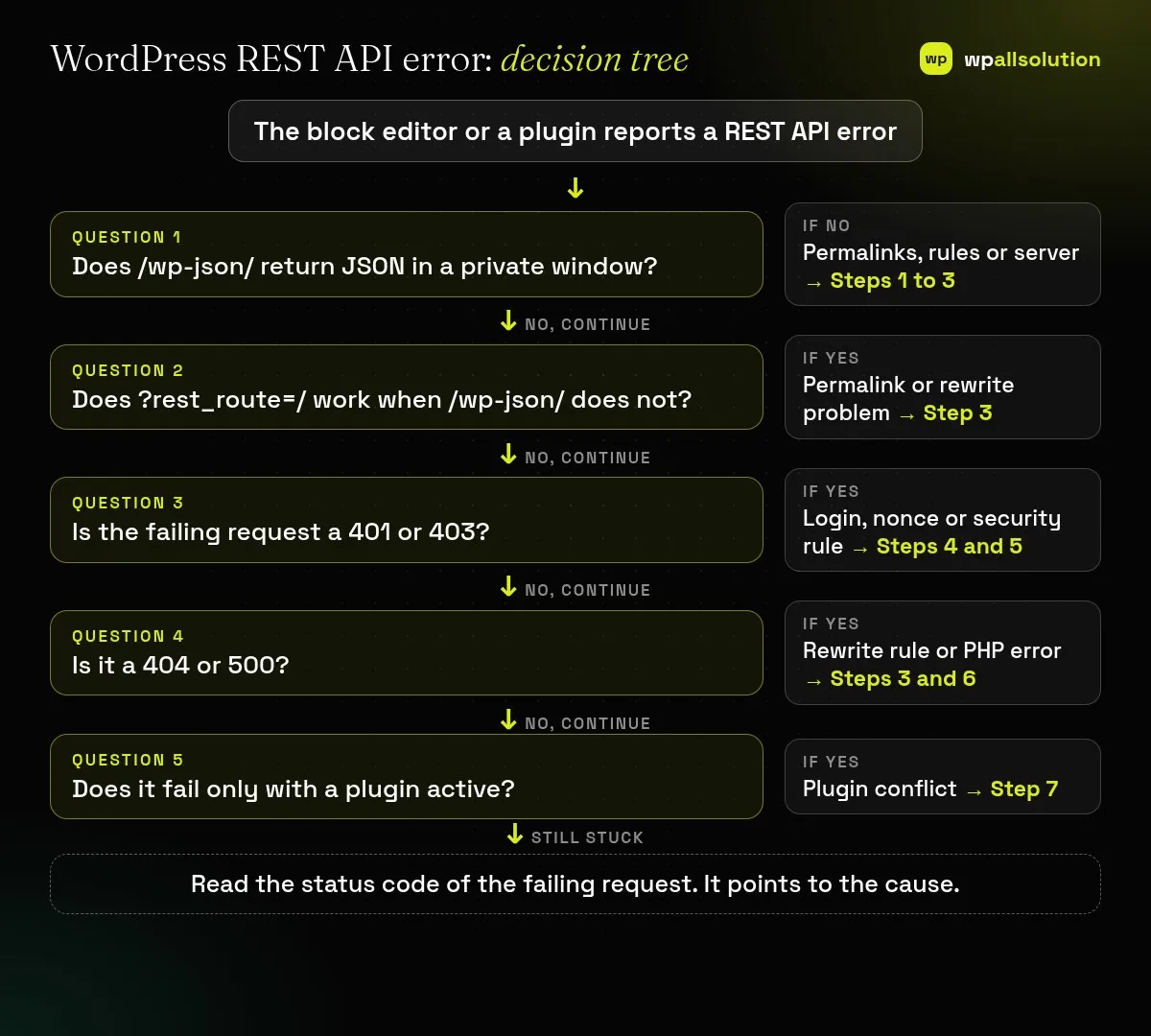
/wp-json/ return JSON in a private window? If not, look at permalinks, rules or the server (Steps 1 to 3).?rest_route=/ work when /wp-json/ does not? Then it is a permalink or rewrite problem (Step 3).| What you see | Likely cause | Start with |
|---|---|---|
| “Not a valid JSON response” | HTML, a redirect or a PHP notice instead of JSON | Steps 1, 3 and 6 |
| /wp-json/ gives 404 | Permalinks or rewrite rules | Step 3 |
| 401 or 403 on the failing request | Not logged in, bad nonce or a firewall rule | Steps 4 and 5 |
| 500 on the failing request | PHP error in a plugin or theme | Step 6 |
| Editor cannot save, front end fine | Block editor request blocked | Steps 2 and 5 |
| Fails only with one plugin on | Plugin conflict | Step 7 |
The REST API handbook explains that a GET request to /wp-json/ returns a JSON response listing available routes. Open it in a private window. JSON (a long block of text starting with a curly bracket) means the API is working for visitors. An error page, a login page, a blank page or a redirect means something is intercepting the request. Note the HTTP status code the browser’s Network tab shows for it.
Open the page that fails, then the browser’s developer tools → Network tab. Repeat the action (save, publish, load a block). Find the red request, usually to a URL containing wp-json or rest_route, and note its status code and the beginning of its response. Also check the Console for errors. The Site Health screen under Tools can show other issues with your site’s configuration.
The handbook says the API normally lives at /wp-json/ when pretty permalinks are enabled, and that without pretty permalinks the route goes in the rest_route parameter, so /wp-json/ becomes /?rest_route=/. If ?rest_route=/ works and /wp-json/ does not, the rewrite rules are the problem. Go to Settings → Permalinks and click Save without changes to regenerate the rules. On Apache or LiteSpeed, a damaged .htaccess file can also cause it (see the WordPress handbook on common errors); rename it as a backup, then regenerate it. Other servers use different configuration, so ask your host.
The handbook says cookie authentication uses a nonce (sent as X-WP-Nonce or _wpnonce) and that the nonce is needed for requests that change data. An expired nonce, a page served from cache, or a logged-out session can therefore give a 401 or 403 in the editor. Log in again, hard-refresh the editor, and exclude admin and editor pages from caching. If the error persists when logged in, the next step is a firewall or security rule.
Security plugins, web application firewalls, CDN rules and host-level protections can block or rewrite REST requests, especially POST, PUT and DELETE ones, or requests with certain content. Look in your security plugin’s log and your host’s firewall log for blocked requests to wp-json. A blocked request often shows as a 403. Ask your host to look at the time of your test. Add an exception for the route only if you understand what it exposes. The handbook describes requiring authentication for all REST requests with a filter, which is a deliberate setting that may block external tools, so check for custom code or a plugin that adds it.
A 500, or “not a valid JSON response”, can come from a PHP warning or error printed before the JSON. WordPress documents debug logging that writes errors to wp-content/debug.log with display off; it recommends debug tools for local and staging use only. Turn it on on staging, reproduce, and read the log for the file named. A redirect, for example from http to https or from non-www to www, can also break the request. Make sure the site address in Settings → General matches the address you use. See WordPress 500 internal server error after a plugin update for more on reading logs.
On staging, switch to a default theme and deactivate all plugins, then reactivate in halves while repeating the failing request. Plugins that change login, security, caching, redirects, headers or the REST API are common suspects. Our guides WordPress plugin conflict and How to find the plugin that broke your site explain the method in detail. If the editor itself is the problem, also see custom blocks versus page builders for background.
/wp-json/ returns JSON in a private window..htaccess file.The handbook says you should not disable it. If needed, require authentication for external access instead, and test the editor.
Often because of permalinks or rewrite rules. Try ?rest_route=/ to confirm.
A short-lived token that proves a request came from a logged-in user’s session.
Your session, browser extensions or a firewall rule for your IP may differ from others.
Test the route, read the status code and follow it to the cause. If the WordPress REST API error remains, send your host or plugin author the failing URL, the status code, the time and the response beginning, without tokens or cookies. If you would like a person to look, wpallsolution offers independent plugin support and emergency WordPress fixes. We cannot promise a fix without seeing your setup.
Last reviewed: October 19, 2026. WordPress is a trademark of the WordPress Foundation. wpallsolution is not affiliated with or endorsed by the WordPress Foundation or Automattic.
A staging site lets you test updates on a copy before customers see them. Learn how to create one, lock it down…
Most break-ins start at the login screen. Use this practical checklist for passwords, two-step login, admin accounts, attempt limits and HTTPS.
Care plans give agencies steady work after launch. See how white label WordPress maintenance works, what to include and what to agree…
Black FridayCyber Monday sale
Before you go,
Our biggest discount of the year on the first payment of every maintenance plan.
BF2026 at checkout