
How to Prevent Spam Orders in WooCommerce: Signs, Causes and Safe Fixes
Bursts of fake or failed orders can mean bots or card testing. Learn the signs, what to tell your payment provider and…
If some customers cannot finish checkout, you lose sales. Use this WCAG 2.2 based checklist to test keyboard use, labels, errors, focus and sign-in.
An accessible WooCommerce checkout is one that every customer can complete, including people who use a keyboard instead of a mouse, a screen reader, voice control or magnification. Checkout is the one page where a barrier costs you the sale directly, and many barriers are simple to find: a field without a clear label, an error that is only shown in red, a button you cannot reach with the Tab key. This guide gives you a checklist based on the Web Content Accessibility Guidelines (WCAG) 2.2 that you can test in an afternoon, without special tools.
Test your checkout with the keyboard alone, with a screen reader if you can, at 200 percent zoom and on a phone. Check that every field has a visible label and clear instructions, that errors are described in text and tied to the field, that the keyboard focus is always visible and not hidden behind a banner, that tap targets are large enough, that address and contact fields support autofill, and that sign-in or CAPTCHA steps do not rely only on memory or puzzles. Fix what fails, retest, and keep a record. Legal requirements depend on your country, so ask an adviser about yours.
How this guide was prepared: it is research-based. We used the W3C WCAG 2.2 pages listed under Sources, checked on October 23, 2026. We did not audit your store, and a checklist is not a legal or full accessibility audit. Themes, checkout types and extensions differ, so test your own site.
A checkout combines forms, error messages, payment widgets, login and sometimes CAPTCHA, so it touches many accessibility rules at once. WCAG 2.2 added nine success criteria, several of which matter directly here. Target Size (Minimum), 2.5.8 at level AA, expects pointer targets of at least 24 by 24 CSS pixels or enough spacing. Focus Not Obscured (Minimum), 2.4.11 at AA, says a focused element must not be fully covered by other content, such as a sticky banner. Redundant Entry, 3.3.7 at A, says information already entered in a process should be auto-filled or selectable instead of re-typed. Accessible Authentication (Minimum), 3.3.8 at AA, says login should not depend on a cognitive test, such as remembering or transcribing, unless an alternative or helper is provided. Consistent Help, 3.2.6 at A, says repeated help options should appear in the same relative order.
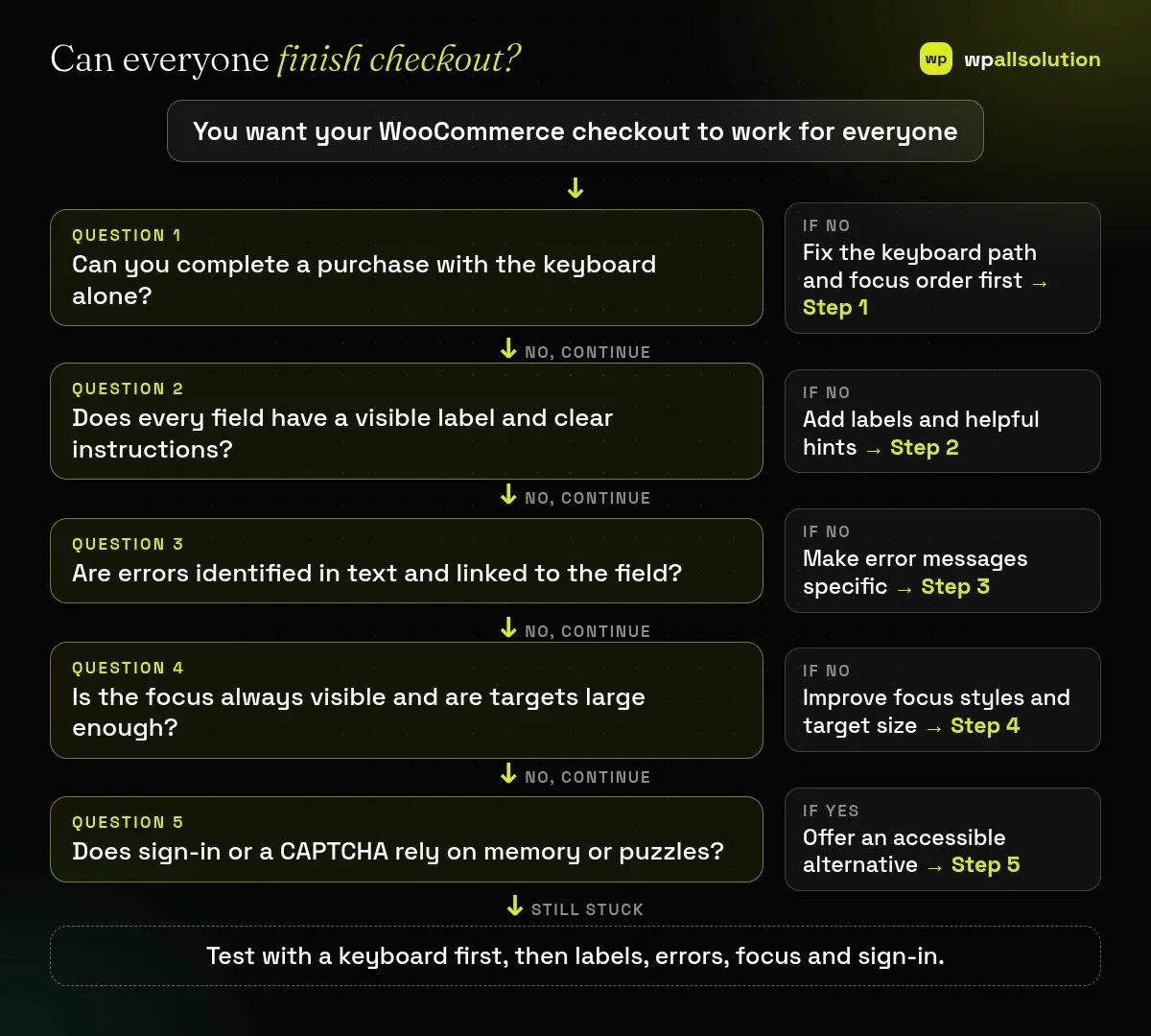
Put the mouse aside. Use Tab and Shift+Tab to move, Enter and Space to activate and arrow keys in groups. You should reach every field, link, shipping choice, payment option and the place order button, in a logical order, without getting trapped. Check that menus and any payment pop-ups can be opened and closed. This single test finds more problems than any other.
Every field needs a visible label that stays in place, not only placeholder text that disappears. Mark required fields clearly and say what format is expected. Fields for name, email, phone and address should support browser autofill by using the correct purpose attributes, so customers do not need to retype what their browser knows; WCAG 2.2’s Redundant Entry also expects information you already collected to be reused, such as a billing address copied to shipping on request. Be careful with field names and autocomplete values: a wrong value can confuse autofill, as we found on our own form when a field named “region” caused a browser warning.
When something is wrong, say what and where in text, such as “Enter a valid email address”, link or move focus to the problem, and do not rely on colour alone. Test by submitting an empty form, a wrong card number and a wrong postcode. Screen reader users must hear the error, for example through an alert. If your checkout fails to submit for other reasons, see WooCommerce checkout not working.
The focused element should have a clear outline at all times, and sticky headers, cookie notices or chat widgets must not hide it (Focus Not Obscured). Buttons and checkboxes should be easy to hit on a phone: aim for at least 24 by 24 CSS pixels, or adequate spacing (Target Size). Text should have enough contrast, and the page should still work at 200 percent zoom without sideways scrolling. Our own checks of pages on this site use automated tools, but those cannot replace a keyboard test.
Accessible Authentication means customers should not be forced to remember a password with no help or solve a puzzle; allow password managers and paste, offer an email link or another method where practical. A CAPTCHA that is a puzzle can block people, so prefer low-friction checks; see stop WordPress form spam. Check that your payment gateway’s fields and pop-ups work with the keyboard and a screen reader, because they are often third-party and outside your theme.
If you can, try a screen reader on one browser and phone, and ask a real user with a disability to try a test order. Write down what you checked, what failed and what you fixed. Repeat after theme, WooCommerce or extension updates. Also check how the checkout type affects your page; see checkout block vs classic, and add accessibility to your WooCommerce maintenance checklist.
The Web Content Accessibility Guidelines from the W3C, a widely used standard for accessible web content. Version 2.2 added nine success criteria.
It depends on your country and business. Ask a qualified adviser. This article is not legal advice.
Overlays and plugins cannot fix every issue. Fixing the markup and styles is more reliable.
After every theme, WooCommerce, extension or gateway update, and at least a few times a year.
Run the keyboard test today and write down what fails. wpallsolution offers a WooCommerce checkout service and WordPress maintenance packages. We cannot promise full compliance and are not a legal adviser.
Bursts of fake or failed orders can mean bots or card testing. Learn the signs, what to tell your payment provider and…
An Indian store has to charge, show and record GST correctly. See how WooCommerce tax settings, classes and rates fit together, and…
Product imports fail for a few predictable reasons. Check the file format, column names, SKU matching, variations, images and server limits one…
Black FridayCyber Monday sale
Before you go,
Our biggest discount of the year on the first payment of every maintenance plan.
BF2026 at checkout