
How to Set Up a WordPress Staging Site and Push Changes Live Safely
A staging site lets you test updates on a copy before customers see them. Learn how to create one, lock it down…
Do you need a monthly maintenance plan or just a fix when something breaks? Six plain questions help you choose, with the trade-offs of each approach.
WordPress maintenance vs one-time fixes is a choice many site owners face the first time something breaks. A one-time fix solves a problem that already exists. Maintenance is regular work that tries to stop the problem from happening. Neither is always better, and the right answer depends on what your website does for your business and who looks after it today. This guide explains both in plain terms and gives you six questions to decide.
Choose ongoing maintenance if your site earns money or leads, uses a store, payments or many plugins, or if nobody on your team owns updates and backups. One-time fixes can be enough for a small site that rarely changes and has a technical owner who accepts the risk. Many sites do best with a mix: a one-time clean-up first, then a light maintenance routine.
How this guide was prepared: it is based on the WordPress documentation listed under Sources, checked on October 23, 2026, and on our own experience of how maintenance and repair work is scoped. We make no claims about savings or uptime, and your result depends on your site and host.
| One-time fix | Ongoing maintenance | |
|---|---|---|
| Goal | Solve a specific problem | Prevent problems and catch them early |
| Typical work | Repair an error, clean a hacked site, speed up a page, move a site | Tested updates, verified backups, monitoring, security checks, reports |
| When it happens | After something breaks | On a regular schedule |
| You pay | Per job | Per month or year |
| Main risk | Problems return, and the site may be down while you search for help | Paying for work you do not use if the site is very simple |
For a full list of what routine care covers, see what WordPress maintenance includes.
WordPress does install minor core releases, which include maintenance and security fixes, automatically by default. According to the official upgrade documentation, major core releases are automatic only for new installs on WordPress 5.6 or later, and plugin and theme updates are automatic only in special cases, typically critical security patches, unless you switch them on. In practice most of what runs your site (plugins, themes, PHP on the server) still needs a person to update it, test it and keep a way back. See WordPress auto updates for how to decide what to automate.
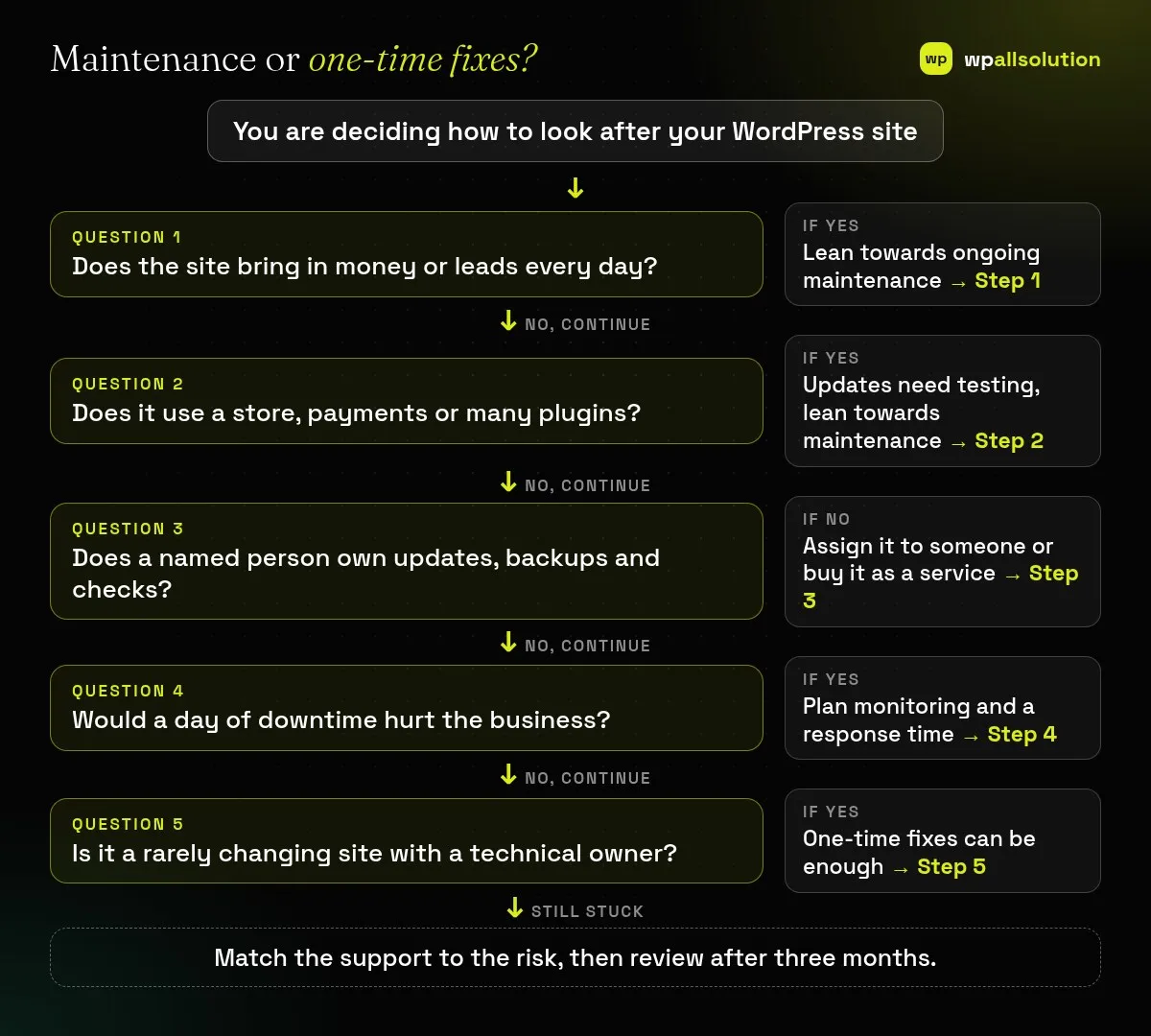
Is it a brochure, a lead generator, a shop or a membership site? The closer the site is to income, the more it costs when it stops. A hobby blog and a checkout page are not the same risk.
List your theme, page builder, plugins, integrations and payment gateways. Every extra piece is another thing that can conflict after an update. A WooCommerce store, for example, depends on a checkout and a payment gateway that should be tested after changes; see WooCommerce checkout not working for how fragile that can be.
If the answer is “nobody” or “whoever remembers”, you do not have a routine. Backups are the clearest example, because a backup nobody has tested is only a hope. Read is your WordPress backup really safe to see what to check.
Use your own numbers: lost orders, missed enquiries, staff time. If an hour offline is cheap for you, a break-and-fix approach is more reasonable. If it is costly, monitoring and a quick response time matter more than the lowest price.
Whichever you pick, ask what is included, what is excluded, how fast someone responds and how backups are tested. Our guide on what WordPress maintenance costs goes through the price drivers.
Choose the smallest option that covers your risks, then look at what actually happened: how many updates, issues and fix hours were needed. Move up or down if the facts show you chose too much or too little.
It depends on risk. A small site that rarely changes and costs little to lose can get by with occasional care, but it still needs updates and backups.
Yes, if you have the time and know how to update safely and restore a backup. The risk is that the routine stops when you get busy.
That depends on the scope. Cleaning a hacked site is usually a separate job, so ask what is included.
Yes. Many owners start with a one-time fix and move to a maintenance routine once they see how often small issues appear.
Answer the six questions, then compare the options on scope and response time. wpallsolution offers WordPress maintenance packages with the price, terms and exclusions shown on the pricing page, and an emergency WordPress fix for one-off problems. We cannot promise outcomes without seeing your site.
A staging site lets you test updates on a copy before customers see them. Learn how to create one, lock it down…
Most break-ins start at the login screen. Use this practical checklist for passwords, two-step login, admin accounts, attempt limits and HTTPS.
Care plans give agencies steady work after launch. See how white label WordPress maintenance works, what to include and what to agree…
Black FridayCyber Monday sale
Before you go,
Our biggest discount of the year on the first payment of every maintenance plan.
BF2026 at checkout