
How to Set Up a WordPress Staging Site and Push Changes Live Safely
A staging site lets you test updates on a copy before customers see them. Learn how to create one, lock it down…
Maintenance prices look random until you see what drives them. Learn the six factors behind the cost and the questions that make quotes comparable.
WordPress maintenance cost is hard to compare because two plans with the same monthly price can cover very different work. One includes daily backups and tested updates, another only lists them. This guide explains the six things that actually move the price and how to read a quote so you compare like with like. We do not quote a “market average”, because published figures vary widely and mix very different services.
The price of WordPress maintenance mostly depends on six things: how complex the site is, how fast you need a response, whether small fixes are included, whether updates are tested on a staging copy, how deep the security and monitoring work goes, and how long you commit. A simple brochure site needs far less than a store that takes payments, so the useful comparison is scope against risk, not one price against another.
How this guide was prepared: it is based on the WordPress documentation listed under Sources, checked on October 23, 2026, and on our own published packages, which we use only as an example. Prices change, so always check the current figures on the pricing page. We do not claim savings, uptime or results.
Maintenance is time, tools and responsibility. Time covers testing updates, watching for problems and fixing small issues. Tools cover backup storage, monitoring and, sometimes, staging environments. Responsibility is the promise to act when something goes wrong. WordPress does not do most of this on its own: its official documentation says minor core updates are automatic by default, while plugin and theme updates are automatic only in special cases, so someone still has to handle the rest. See what WordPress maintenance includes for the task list.
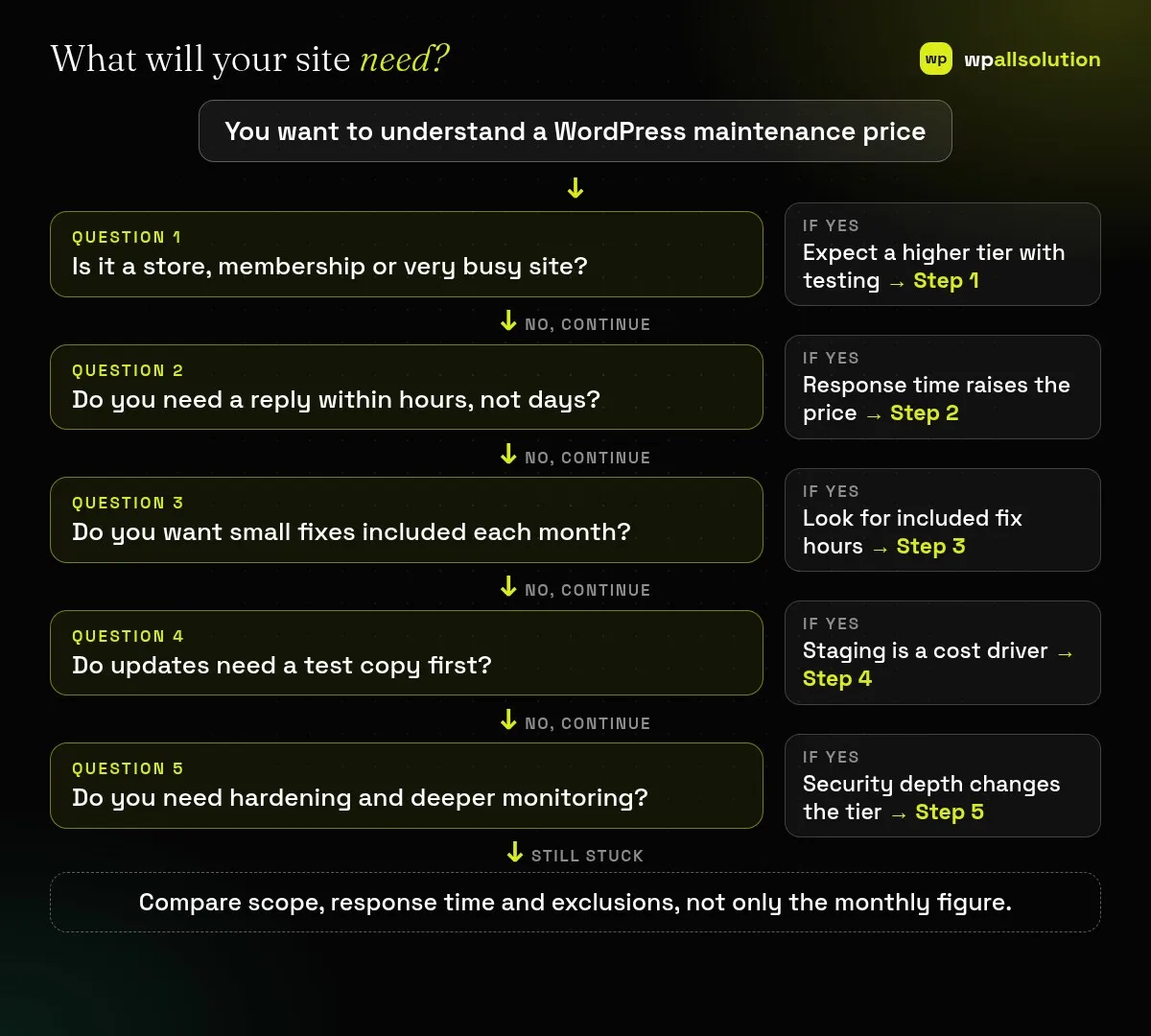
A small brochure site has few moving parts. A WooCommerce store has payments, shipping, tax and many extensions, and each update can affect checkout. A membership or booking site stores user data and depends on integrations. More parts mean more testing and more risk, so the price rises with complexity. For stores, our WooCommerce checkout troubleshooting guide shows why checkout needs checking after changes.
A reply “within two business days” and a reply “within four business hours” are different promises. Faster response needs people on standby, so it costs more. Decide what a slow response would cost you, and match the plan to that, not to the most impressive number.
Some plans include a few hours of small fixes each month; others cover only the routine work and bill every fix separately. An unused included hour is not a refund, so choose a number that matches how often you really need changes.
Testing updates on a copy of the site before touching the live one takes extra time and an extra environment, but it is how breakage is caught early. Ask whether staging is included, optional or not offered. Our guide to updating WordPress plugins safely explains the routine.
Basic care keeps software updated, backed up and monitored for downtime. Deeper plans add firewall rules, login hardening, vulnerability scanning and priority response. These help reduce risk but cannot guarantee that a site is never attacked, and a security plugin does not replace updating PHP and WordPress. Read PHP2Shell and website security for a current example.
Monthly billing often costs more per month than yearly billing, and a minimum term lowers the provider’s risk. Check the term, the notice period, and whether a monthly report is included so you can see what was actually done.
To show how scope changes the price, here is how our packages are arranged at the time of writing; the pricing page is always the current source. Basic keeps a simple site updated, backed up and monitored, with no fix hours included. Advanced adds hardening, speed work and a couple of fix hours each month. Pro adds WooCommerce care and SEO monitoring with more fix hours. Business adds a faster response, a dedicated staging environment and priority handling. India prices are in rupees and exclude GST; international prices are in US dollars. The rule is the same for any provider: the more testing, response speed and scope, the higher the tier.
It is usually monthly or yearly depending on the provider. Yearly billing often lowers the monthly equivalent but commits you for longer.
Only if fix hours or emergency work are listed. Otherwise fixes are billed separately.
Scope, response time, testing and security depth differ. Compare those, not just the figure.
Yes, but you carry the risk between fixes. See maintenance vs one-time fixes.
Related guide: WordPress Maintenance Reports: What a Monthly Report Should Include
Use the six factors to write down what your site needs, then compare the plans on scope and exclusions. wpallsolution shows its WordPress maintenance packages with terms and exclusions on the pricing page, and you can contact us to talk about your site. We cannot promise results without seeing your setup.
A staging site lets you test updates on a copy before customers see them. Learn how to create one, lock it down…
Most break-ins start at the login screen. Use this practical checklist for passwords, two-step login, admin accounts, attempt limits and HTTPS.
Care plans give agencies steady work after launch. See how white label WordPress maintenance works, what to include and what to agree…
Black FridayCyber Monday sale
Before you go,
Our biggest discount of the year on the first payment of every maintenance plan.
BF2026 at checkout