
WordPress Login Redirect Loop: Fix Being Sent Back to wp-login
You type the right password and WordPress sends you back to the login page. The cause is usually cookies, address settings, caching…
Before you share designs, access or client details with a white label partner, agree confidentiality in writing. See what an NDA usually covers and what it does not.
An NDA for white label WordPress work is a written agreement that a partner will keep your and your client’s information private. In white label work you hand a developer designs, content, access to sites and sometimes customer data, and your client may not know a partner is involved at all. An NDA is not the only protection you need, but it sets the basic rules before you share anything. This guide explains what an NDA usually covers, what it does not, and the everyday habits that matter as much as the paper.
Agree confidentiality in writing before you share client names, designs, logins or data. A typical NDA names the parties, defines what counts as confidential information, lists what is excluded (such as information that is already public), sets how long the duty lasts, says who may see the information, requires safe handling and covers return or deletion at the end. An NDA protects information; it does not by itself transfer ownership of the work, so use project terms for that. This article is general information, not legal advice. Ask a qualified lawyer to review the contract you use.
How this guide was prepared: it describes common practice in agency and partner work and how we handle white label projects at wpallsolution, where branding, communication and confidentiality rules are agreed before each project. We cite no external legal source, because requirements differ by country, and we make no claims about enforceability.
An NDA (non-disclosure agreement, also called a confidentiality agreement) is a promise not to disclose or misuse specified information. In white label WordPress work it can protect the client’s business details, unreleased designs and content, access details, customer data and the fact of the partnership itself, if you agree that. It does not decide who owns the finished website, how revisions work, or what happens to payment disputes; those belong in the project terms. It also does not remove the need for good access hygiene: a signed NDA will not help if passwords were pasted into a chat.
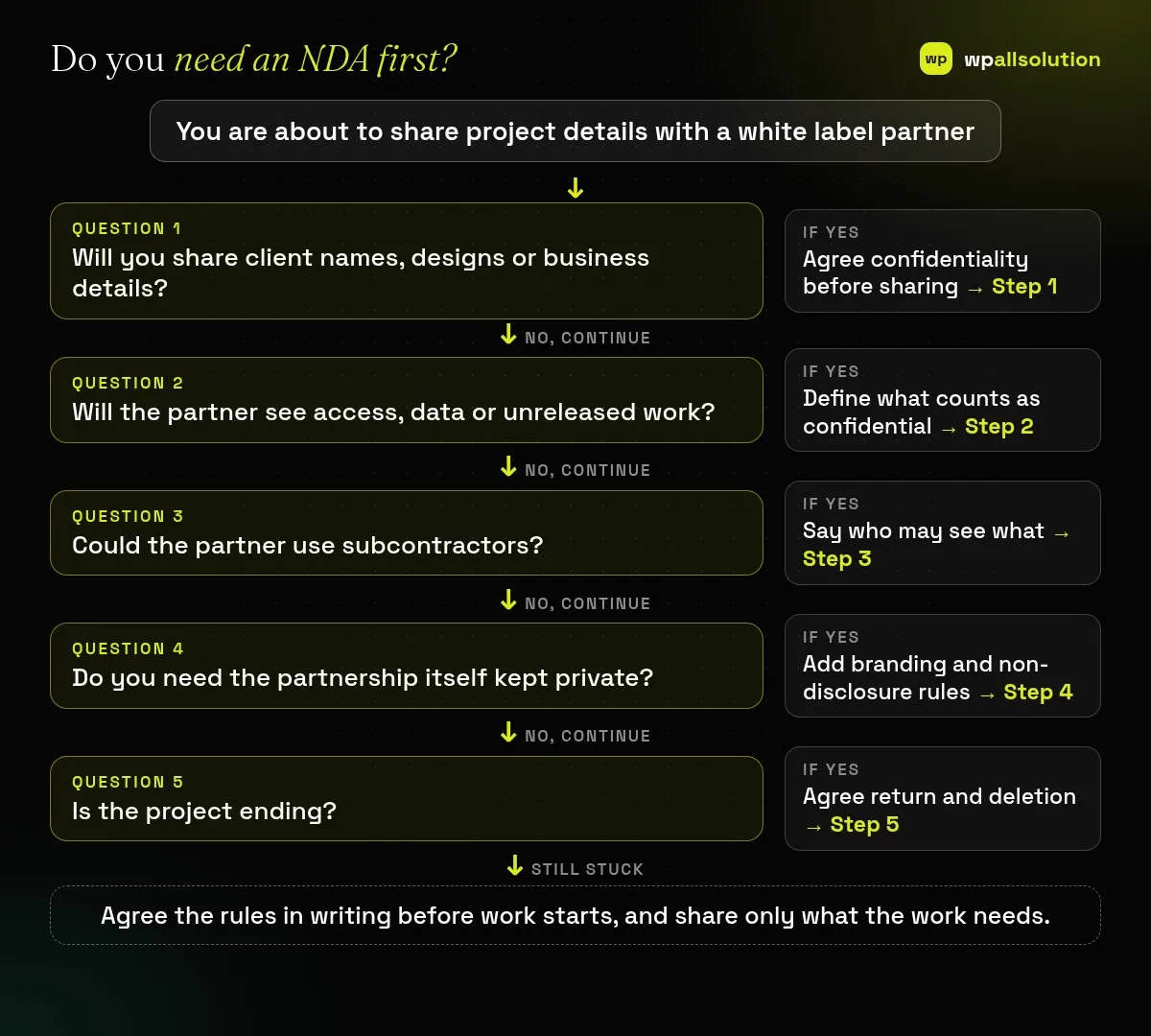
Name who is bound (your agency and the partner, or one-way if only one side shares secrets) and state the purpose: the information may be used only for the agreed project. A clear purpose prevents the partner from using your material for anything else.
List the kinds of information: client names and contact details, briefs, designs, source files, content, credentials, customer data, pricing, and the identity of your client if you want that protected. Say whether information has to be marked confidential or whether everything you share in the project counts.
Most NDAs allow disclosure only to people who need to know for the project and who are bound by similar duties. If the partner uses subcontractors, say whether that is allowed, whether you must approve them and who is responsible for them. This also covers access: a named account for each person lets every change be traced, and our guide to choosing a WordPress maintenance provider lists access questions to ask.
Standard exclusions include information that is already public (not through the partner’s fault), was already known to the partner or must be disclosed by law. Separately, white label arrangements usually agree whether the partner may be named, whether they may contact your client and whether they may show the work in a portfolio. In our white label service these rules are agreed before each project starts; see what white label WordPress development is.
Say how long the duty lasts, often for a number of years beyond the end of the project, and how information must be handled: use secure channels, do not store secrets in public tools, and report any leak quickly. Keep passwords and client data out of briefs; share access securely and remove it when the work ends. The WordPress hardening guidance recommends limiting access and using strong credentials, which fits the same habits.
Agree what happens when the project ends: the partner returns or deletes your materials and access, and confirms it. For a live site, also remove the partner’s user accounts and rotate shared credentials. Keep a short record of who had access and when.
You can raise an NDA or confidentiality agreement in your enquiry, before you share anything sensitive. We agree the terms for the project.
Only if the agreement says so. Branding and communication rules are agreed separately and in advance.
It can be a start, but have a lawyer check it for your country and your situation.
Share as little as you can, and do not send passwords or client data in a brief or form.
Related guide: How to Brief a White Label WordPress Developer (with a Brief Checklist)
Write down what you will share, decide what must stay private and agree the rules before work starts. wpallsolution works with agencies and freelancers under their own brand; see our white label WordPress development service or contact us and mention any NDA first. This is not legal advice, and we cannot promise outcomes without seeing your project.
You type the right password and WordPress sends you back to the login page. The cause is usually cookies, address settings, caching…
Most break-ins start at the login screen. Use this practical checklist for passwords, two-step login, admin accounts, attempt limits and HTTPS.
A staging site lets you test updates on a copy before customers see them. Learn how to create one, lock it down…
Black FridayCyber Monday sale
Before you go,
Our biggest discount of the year on the first payment of every maintenance plan.
BF2026 at checkout