
How to Set Up a WordPress Staging Site and Push Changes Live Safely
A staging site lets you test updates on a copy before customers see them. Learn how to create one, lock it down…
A redirect loop means two rules keep sending the browser to each other. Learn how to check URL settings, HTTPS rules, a CDN and plugins in a safe order.
ERR_TOO_MANY_REDIRECTS in WordPress is the message Chrome shows when a page keeps sending the browser to another address that sends it back again, until the browser gives up. Other browsers word it differently, for example “The page isn’t redirecting properly”. The loop is almost always caused by two rules that disagree about the correct address, such as HTTP versus HTTPS or www versus non-www. This guide shows how to find those two rules and keep only one.
A redirect loop means rule A sends visitors to address B, and rule B sends them back to address A. Common pairs are the WordPress address settings against a server HTTPS rule, a CDN SSL mode against an origin redirect, and a redirect plugin against a rule in .htaccess. Start by clearing cookies, check that the Home and Site addresses match, check your CDN mode, make sure only one thing forces HTTPS or www, and then look at plugins and .htaccess.
How this guide was prepared: it is research-based. We used the WordPress developer documentation and the Cloudflare documentation listed under Sources, checked on October 23, 2026. We did not reproduce your loop on a live site, and your host or CDN may behave differently, so change one thing at a time and keep a backup.
A redirect is a server answer that says “this page now lives at another address”. Browsers follow a chain of these but stop after a limit. In WordPress a loop usually involves the address stored in the settings, a rule that forces a certain scheme (https) or host (www), and sometimes a CDN in front of the site. Because several layers can each add a redirect, the same site can work for one visitor and loop for another, or loop only after you switch HTTPS on.
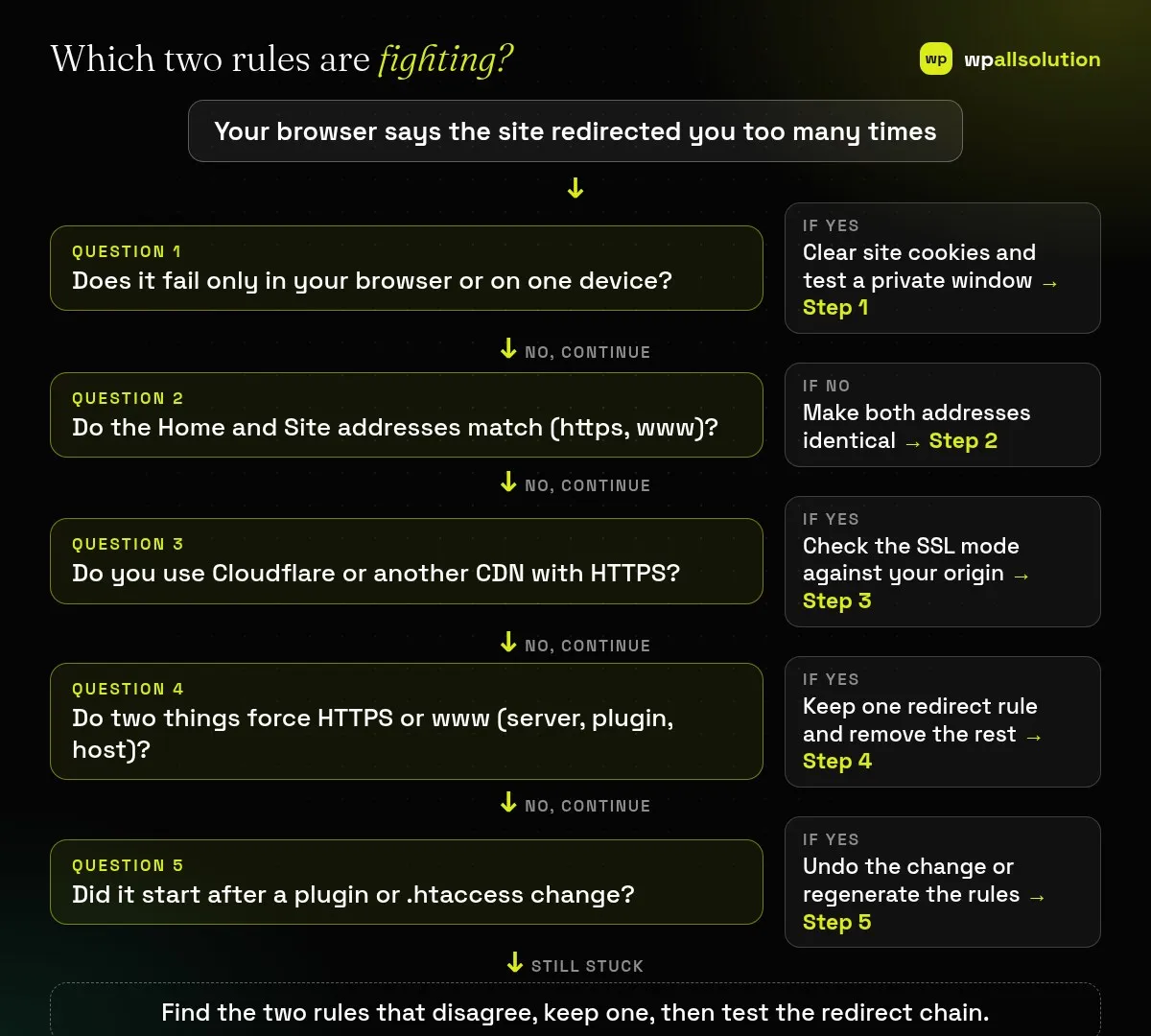
.htaccess change? Undo it or regenerate the rules (Step 5).| What you see | Likely cause | Start with |
|---|---|---|
| Loop only on your own device | A stale cookie or cached redirect | Step 1 |
| Loop right after you added an SSL certificate or switched to HTTPS | Address settings or redirect rules disagree about the scheme | Steps 2 and 4 |
| Loop only when the CDN is on | CDN SSL mode does not match the origin redirect | Step 3 |
| Loop after installing or changing a redirect or security plugin | A plugin rule fights a server rule | Step 5 |
| Loop only for non-www (or www) | Two host rules point at each other | Steps 2 and 4 |
Open the site in a private window and from another device or network. If it loads there, delete the cookies and cached data for your site in your browser and try again. A loop that appears only for you is a local problem, and the steps below are not needed.
WordPress stores two addresses: the WordPress Address (where the core files live) and the Site Address (what visitors type). The developer documentation says both should include https:// when you use HTTPS and should not end with a slash. If they disagree about the scheme or about www, a redirect plugin or server rule may keep correcting one to the other. Check them under Settings → General. They can be hard coded with WP_HOME and WP_SITEURL in wp-config.php, and then the screen cannot edit them. If you are locked out, WP-CLI can read and set the values with wp option get home, wp option get siteurl and wp option update, after you back up the database.
Cloudflare documents the usual loops. In Flexible mode Cloudflare talks to your server over plain HTTP, so if your server redirects HTTP to HTTPS, the two keep bouncing. The fixes are to remove the HTTPS redirect from the server or to use Full or Full (strict), which need an SSL certificate on the origin (a valid one for strict). In Full modes a loop appears instead if the origin redirects HTTPS back to HTTP. Cloudflare also lists Always Use HTTPS, HSTS and redirect or page rules as other loop sources. Other CDNs have similar settings, so read yours.
List every place that can force HTTPS or a host: the .htaccess file or server configuration, your host’s “force HTTPS” switch, an SSL or redirect plugin, your SEO plugin’s redirects, and your CDN. Keep one authority and switch the others off. Then test the chain from the command line with curl -sIL https://yourdomain.com and read the HTTP and location lines; a healthy site shows at most one or two redirects, and a loop repeats the same addresses.
If it began after a plugin change, deactivate that plugin, or all plugins, from the dashboard or by renaming the plugin folder, and test. Our guide on finding the plugin that broke your site shows a safe way. If it began after an edit to .htaccess, restore the previous copy, or rename the file and save Settings → Permalinks to make WordPress write a fresh one (on servers that use it). If you moved the site recently, also read moving WordPress to a new host.
.htaccess; Nginx uses its own server configuration, so ask your host where redirects live.http://, https://, with and without www, and lands on one final address.curl -sIL shows a short, non-repeating chain.Usually not. It is two rules disagreeing, whether in WordPress, the server, a plugin or a CDN.
Because the address settings, server rule or CDN mode may not agree about the scheme. Check Steps 2 to 4.
Only if the problem is in your browser. If it also fails in a private window or another device, the cause is on the site or the CDN.
Yes with a copy of the file. A single wrong character can take the site down, so keep the original ready.
Related guide: WordPress Posts Showing 404 Errors: Fix Permalinks and Rewrite Rules
Find the two rules, keep one and test the chain. If your site still loops, or a CDN or SSL change is involved, wpallsolution offers an emergency WordPress fix and WordPress maintenance packages. We cannot promise a result without seeing your setup.
A staging site lets you test updates on a copy before customers see them. Learn how to create one, lock it down…
Most break-ins start at the login screen. Use this practical checklist for passwords, two-step login, admin accounts, attempt limits and HTTPS.
Care plans give agencies steady work after launch. See how white label WordPress maintenance works, what to include and what to agree…
Black FridayCyber Monday sale
Before you go,
Our biggest discount of the year on the first payment of every maintenance plan.
BF2026 at checkout