
WordPress Login Redirect Loop: Fix Being Sent Back to wp-login
You type the right password and WordPress sends you back to the login page. The cause is usually cookies, address settings, caching…
Employee, freelancer, agency or white-label partner? Compare what each option gives you and what to ask before you sign.
If you need to hire a WordPress developer, the first question is not who, but which kind of help fits your work: an employee, a freelancer, an agency or a white-label partner. Each has strengths and costs, and the wrong choice usually shows up later as delays, unclear ownership or a developer who cannot be reached. This guide compares the four options for small businesses and agencies and lists what to put in writing before work starts.
An in-house developer fits steady, year-round work and gives you control, but you carry salary, management and cover for leave. A freelancer fits defined or occasional projects, but one person is a single point of failure. An agency covers design, development and support under one contract, usually at a higher price. A white-label partner suits agencies that resell work under their own brand and need extra capacity. Whatever you choose, agree scope, ownership of code and accounts, access rules, a backup contact and a handover in writing.
How this guide was prepared: it is experience-based and general, not research from outside sources. We are a WordPress development company, so we have an interest in this topic; weigh our view with that in mind. We do not quote prices because they vary by country and skill.
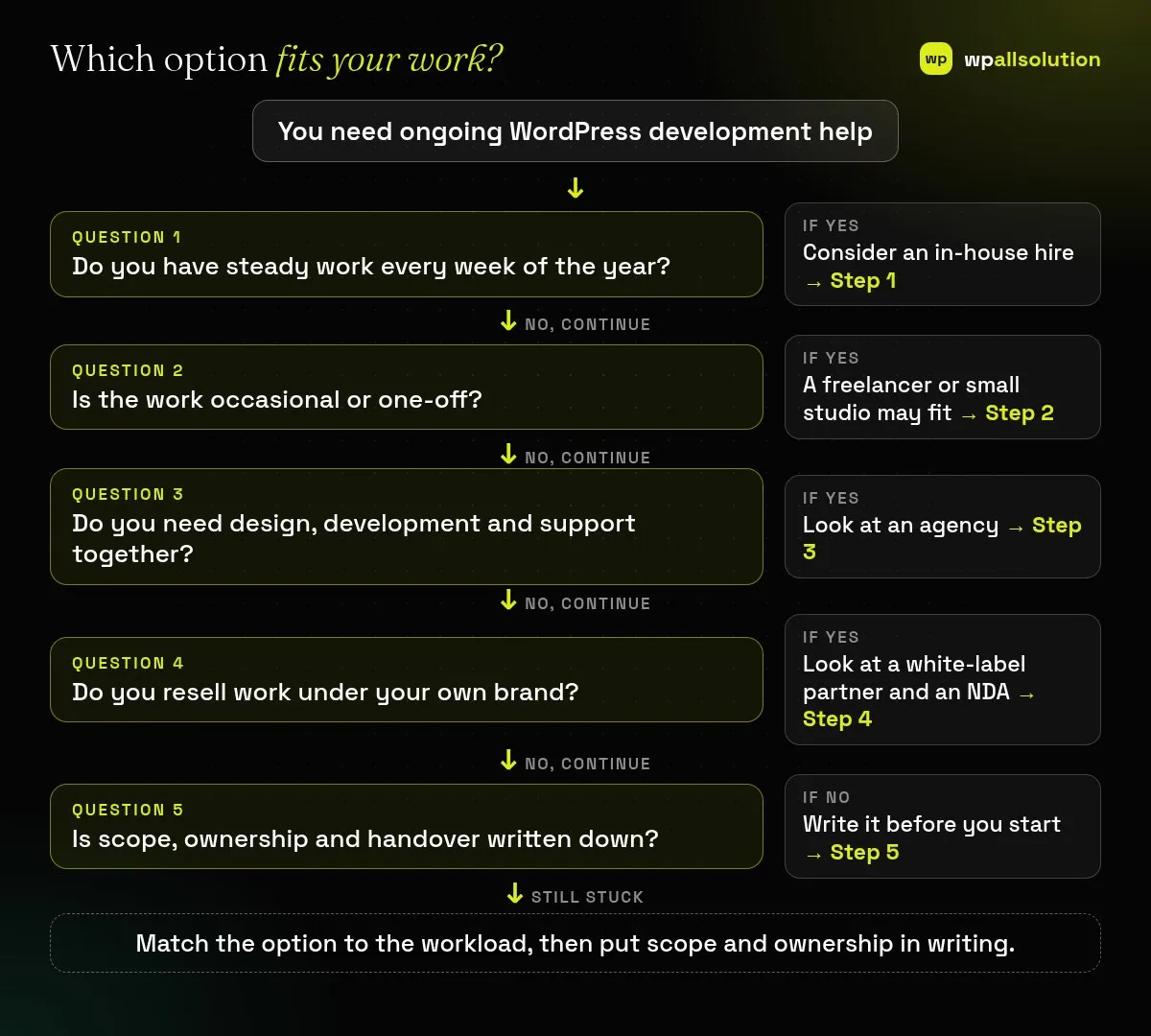
List the work you expect over a year: new builds, changes, updates, fixes and support. If it fills most of a full-time role, an employee may be cheaper than outsourcing. If it comes in bursts, you may pay for idle time. Remember to add management time, equipment, leave cover and the risk of a skills gap.
Freelancers work well when the task is specific, such as a plugin integration or a theme fix. Ask for examples of similar work and a reference. Ask what happens if they are ill or busy, and avoid giving them your only admin login; create a named account for each person; see WordPress user roles.
If your project mixes design, development, content and ongoing care, one contract with a team can be simpler. Ask who will actually do the work, how they communicate, how they handle emergencies and whether they offer maintenance after launch. Our WordPress development service is one example of this model.
Agencies often outsource build or maintenance work under their own brand. Agree on confidentiality in an NDA; see NDA for white-label work. Give a clear brief; see how to brief a white-label developer. Decide who talks to the end client and how reports are shared; see white-label WordPress maintenance.
Whatever route you choose, write down: what is included and excluded, how changes are priced, who owns the code, designs and accounts, how access is granted and removed, how fast urgent issues are answered, and how files and documentation are handed over at the end. Start with a small paid trial task before a big project. Ask for work on a staging site, not your live site.
It depends on your workload. Steady full-time work can favour hiring, while occasional work usually favours outsourcing.
Give the lowest access that fits the job, use a named account and remove it when the work ends.
Not automatically in every country. Put ownership in the contract.
A developer or team that does the work behind your brand, so your client deals only with you.
Write your workload list and one-page scope, then compare two or three options against it. If you want to talk about development or white-label support, see WordPress development, check pricing or contact us. We cannot promise a fit before we see your needs.
You type the right password and WordPress sends you back to the login page. The cause is usually cookies, address settings, caching…
Old PHP stops getting fixes, but a rushed update can break plugins. Learn to check your version, test compatibility and switch PHP…
A staging site lets you test updates on a copy before customers see them. Learn how to create one, lock it down…
Black FridayCyber Monday sale
Before you go,
Our biggest discount of the year on the first payment of every maintenance plan.
BF2026 at checkout