
AI-Generated Content on WordPress and Google: What the Guidance Says
Is AI content allowed on your WordPress site? Here is what Google's guidance says about quality, scaled spam, fact checking and honest…
AI plugins can send your content or customer data to outside services. Use this checklist to check data, cost, safety and exit before you install one.
Before you install a WordPress AI plugin, ask what it does with your data, what it really costs, what it can change on its own and how you would remove it. Many AI plugins send text, images or customer details to an outside service, and some bill by usage, so a plugin that looks free can still create cost and privacy questions. This checklist helps you decide in plain terms.
Read the plugin’s data and privacy terms to learn what it sends and to whom. Work out the usage cost, not only the plugin price. Do not let it publish or edit content without human review, and give it the lowest role it needs. Check that it is actively maintained and works with your WordPress and PHP versions. Test on staging, and make sure you can switch it off and remove its data. If you handle customer or health data, get advice before sending any of it to an AI service.
How this guide was prepared: it is research-based. We used the WordPress.org plugin guidelines listed under Sources, checked on October 23, 2026. We do not review or recommend specific plugins here, and your legal duties depend on your country and business.
The WordPress.org plugin guidelines say that plugins may not contact external servers without explicit and authorised consent, and that data collection needs the user’s confirmation. They also say services should be clearly documented in the readme. These rules apply to plugins listed in the official directory; a plugin you download elsewhere may not follow them, so read the terms yourself. Using a SaaS service means you accept that service’s terms once you install, register and configure the plugin.
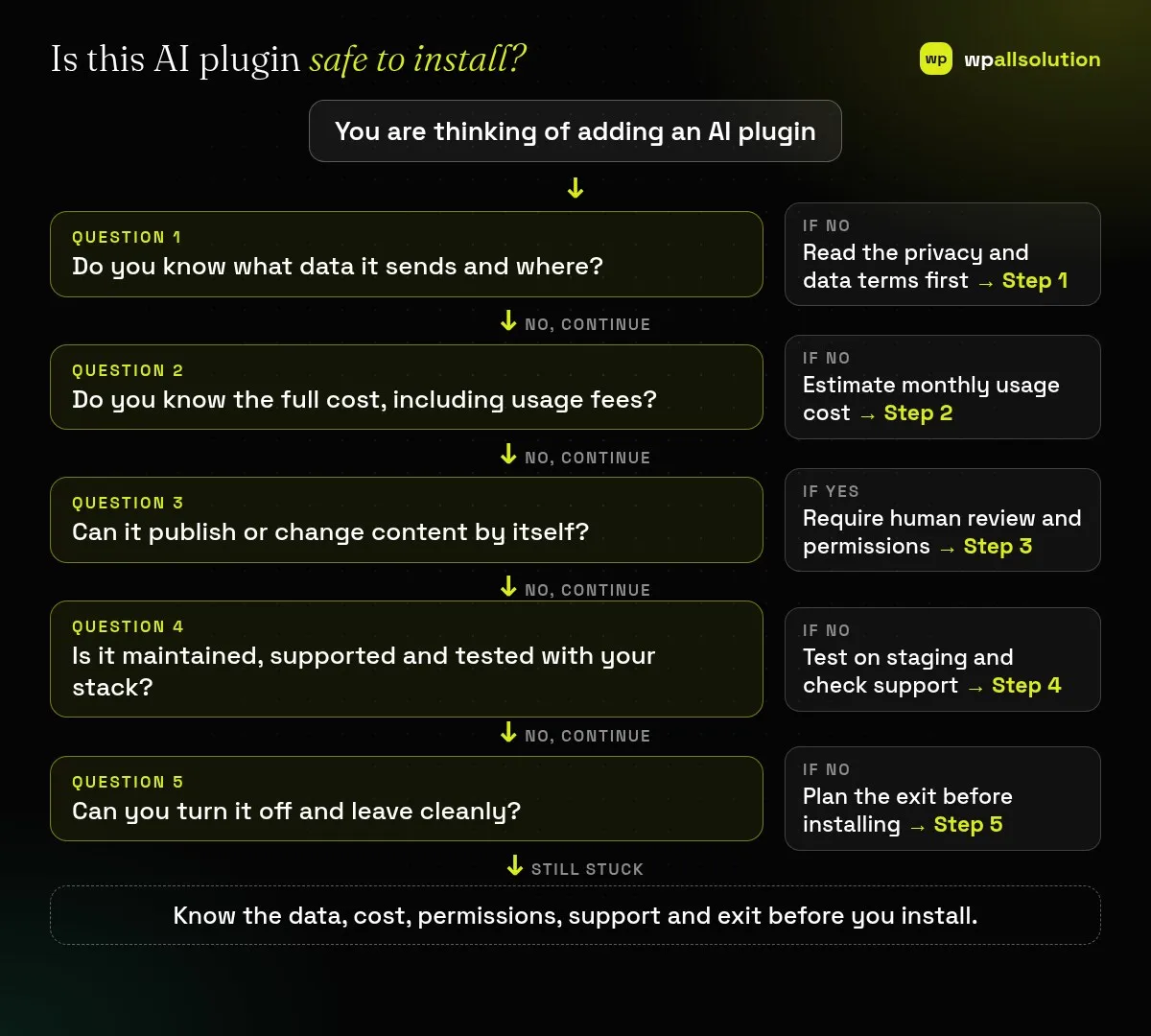
Look in the readme, privacy policy and settings. Does it send post content, form entries, user emails or order data? Which provider receives it, in which country, and is it used to train models? Prefer plugins that let you choose what is sent and that explain it clearly. Avoid sending personal or confidential data unless you have a legal basis and a contract that covers it.
Many AI features charge by usage, such as per request or per amount of text. Estimate how many requests you will make in a month, add the plugin licence, and set a spending limit with the provider if possible. A feature used by many visitors, such as a chatbot, can cost far more than one used only by your editors.
Prefer tools that suggest and wait for a person to approve. Be careful with features that publish, delete or change settings automatically. Give any connected account only the permissions it needs; see WordPress user roles. Review AI-written text before publishing it; see AI-generated content and Google.
Look at the update history, support responses and compatibility with your WordPress and PHP versions. Install it on a staging copy first; see WordPress staging site. Watch page speed and errors, since some AI plugins load heavy scripts. If a plugin was just released or has little track record, wait or run a small trial.
Before installing, ask what happens to your content and settings if you deactivate or delete it. Check whether it leaves data in your database, whether you can export what it created and how to cancel the paid service. Our overview adding AI to WordPress responsibly covers the wider picture.
It depends on the plugin and how you use it. Check data handling, permissions and maintenance before you decide.
Often yes. Many connect to an outside service, so read the terms to see exactly what is sent.
Not always, but one helps with staging, permissions and privacy checks.
You can, but the connected AI service may still charge you for usage.
List the AI features you actually need, then check one plugin against these five steps. wpallsolution works with WordPress AI features; contact us to talk through your case. We cannot make legal decisions about your data.
Is AI content allowed on your WordPress site? Here is what Google's guidance says about quality, scaled spam, fact checking and honest…
Where AI genuinely helps a WordPress site, where it does not, and how to add it safely: keys, privacy, cost limits and…
Your host says admin-ajax.php is using too much CPU. Find which action and plugin is calling it, then reduce the load safely.
Black FridayCyber Monday sale
Before you go,
Our biggest discount of the year on the first payment of every maintenance plan.
BF2026 at checkout