
WordPress Login Redirect Loop: Fix Being Sent Back to wp-login
You type the right password and WordPress sends you back to the login page. The cause is usually cookies, address settings, caching…
Large images are a common reason pages feel slow. Choose the right format, size and loading behaviour, and avoid lazy loading your main image.
To optimize images in WordPress, you need to get four things right: the file format, the pixel size, the width and height attributes, and when each image loads. Images are often the heaviest part of a page, so a few changes here can make a slow page feel faster without touching your design. This guide explains each choice in plain language, including the one mistake that makes things worse: lazy loading the main image at the top of the page.
Resize photos to roughly the largest size they display before you upload them. Use WebP or AVIF for photos where your setup supports them, keep SVG for logos and icons, and avoid huge PNG files for photographs. Make sure images have width and height so the page does not jump while loading. Lazy load images below the fold, but do not lazy load the main image visible at the top, because that delays your Largest Contentful Paint. Test on a phone before and after.
How this guide was prepared: it is research-based. We used the web.dev and WordPress sources listed under Sources, checked on October 23, 2026. We did not test your site, and savings depend on your images, theme and host.
Support depends on your server’s image library and the visitor’s browser, so check results after switching. Keep the originals.
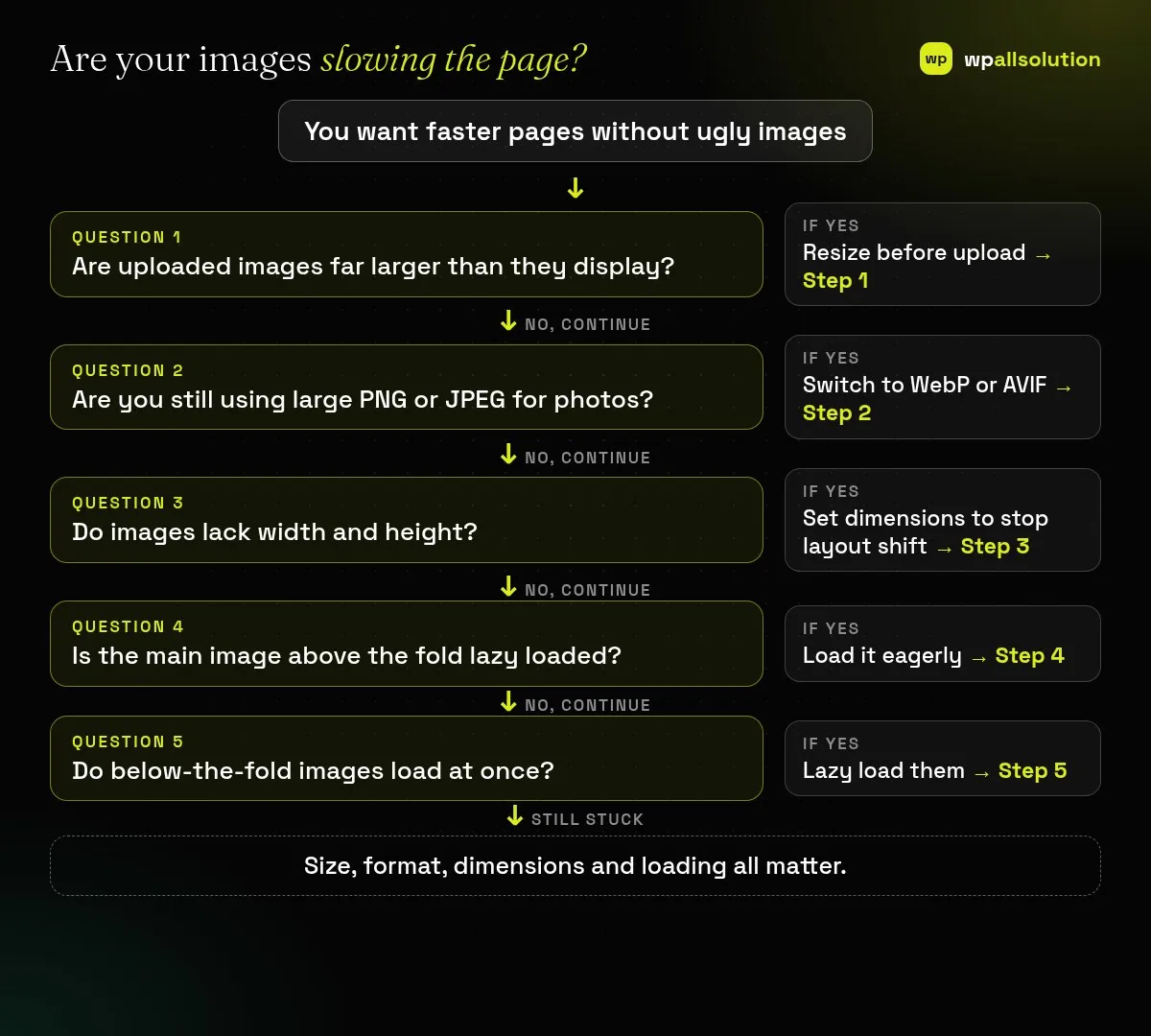
A 6000-pixel photo shown in a 800-pixel column wastes bandwidth. Resize to about the largest size it will be shown, allowing a little extra for sharp screens. WordPress creates several sizes from an upload and shows the best one using srcset, but it still stores the original, so smaller uploads save space too. Check Settings, Media for the generated sizes.
For photographs, test WebP or AVIF and compare file size and quality. Many optimisation plugins can convert and serve these formats; choose one that keeps a fallback for browsers that cannot show them and that lets you restore originals. Do not convert logos that should be SVG.
If the browser does not know an image’s size, the page shifts when the image loads. WordPress normally adds width and height to images in content, but page builders, custom code and some themes can omit them. Check the HTML of your key pages. This protects your layout stability; see cumulative layout shift in WordPress.
Lazy loading delays an image until it is near the screen. That is helpful for images far down the page, but the image that is the largest element on first view should load right away. Recent WordPress versions try to avoid lazy loading the first large image, but themes and plugins can undo it. If your Largest Contentful Paint is slow, look at that image first; see LCP in WordPress.
Images below the fold, such as gallery pictures and footer logos, can load as the visitor scrolls. WordPress adds a loading attribute to images by default, so you may not need a plugin for this. Avoid stacking several lazy-load plugins, which can conflict.
Often WebP files are smaller at similar quality, but results vary by image, so compare.
Newer WordPress versions can handle AVIF if the server’s image library supports it. Check with your host.
Not always. Resizing before upload and WordPress defaults go a long way, and a plugin helps with bulk conversion.
No. Leave the main image at the top of the page to load normally.
Related guide: WordPress Image Upload Errors: HTTP Error, “Upload Failed” and Size Limits
Pick your three heaviest pages, check their images and fix the largest ones first. If speed is a wider problem, see our WordPress maintenance page or contact us. We cannot promise a specific score.
You type the right password and WordPress sends you back to the login page. The cause is usually cookies, address settings, caching…
Old PHP stops getting fixes, but a rushed update can break plugins. Learn to check your version, test compatibility and switch PHP…
A staging site lets you test updates on a copy before customers see them. Learn how to create one, lock it down…
Black FridayCyber Monday sale
Before you go,
Our biggest discount of the year on the first payment of every maintenance plan.
BF2026 at checkout